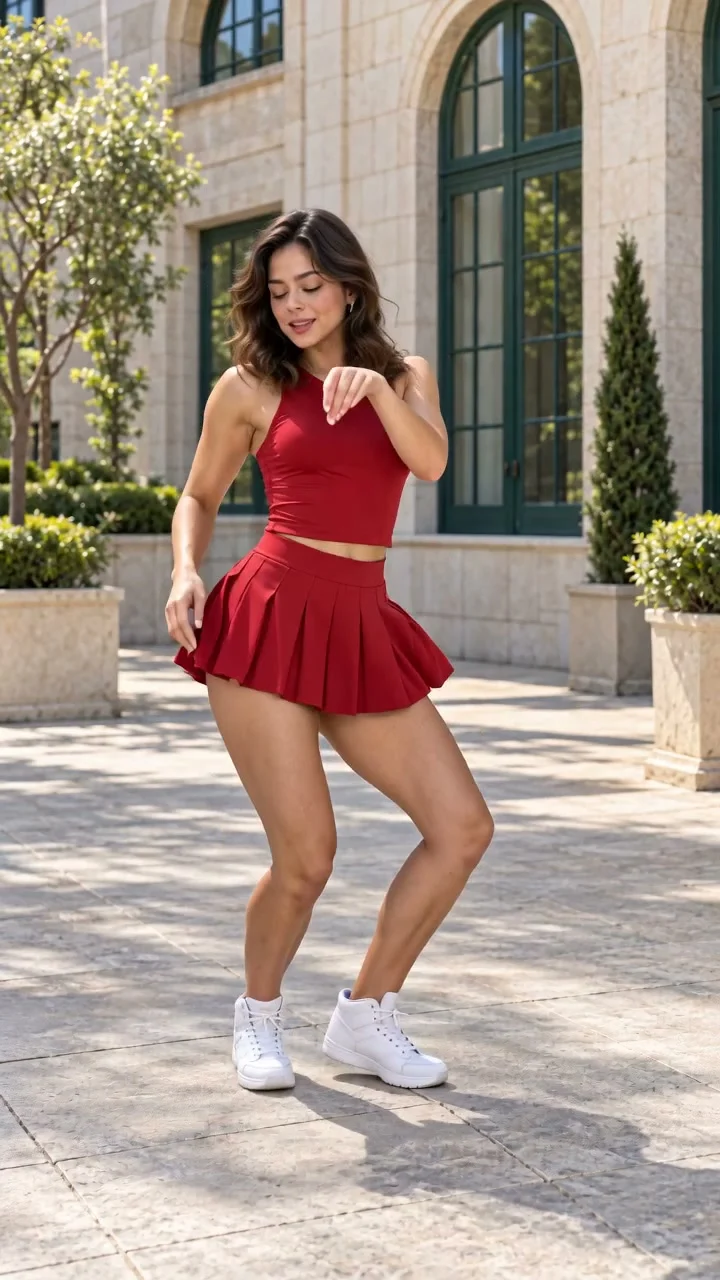
Create a Babydoll dance AI video with EveryGen AI. Start in Inspiration to shape your dancer and scene, or switch to Normal for a ready-filled prompt and native model controls. Watch our original adult performer, then use the included dance Template to animate your own subject.
Generated videos are stored for 24 hours, then deleted. Download files you want to keep.
Babydoll Dance AI video
Babydoll Dance AI · about 11s · 720 × 1280 original · Sound on play. Compact preview; native 720p sources available below.Recorded source demo · Seedance 2.0
Open the video editor with the prepared prompt. Review credits before generating; guest checkout is available.
A Babydoll dance AI video made with EveryGen AI
Watch the single completed example, inspect its actual settings and prepare your own dancer. Your generated result can differ. Press play for sound. Compact previews keep playback light. Open each native 720p source for full quality.
HUMAN MOTION TEMPLATE / 11s · 720p
Original Babydoll dance in EveryGen AI
A fictional adult performer in a red dance outfit completes the 11-second routine in a sunny courtyard. Original 720p output, with generated instrumental sound.
Seedance 2.0 · 720 × 1280 · Original generated audio
An original EveryGen AI interpretation featuring a fictional adult dancer in a sunny courtyard, generated with Seedance 2.0 at native 720p. Choreography was reconstructed from observed reference frames. The existing song recording is not included; generated sound is an original instrumental rhythm. Face, hands and step timing can vary.
Demo model
Seedance 2.0
Source export
720 × 1280
Requested length
11s
Audio
Original native soundtrack
For Template, describe one adult subject or upload authorized appearance photos. The first photo also guides the scene. The reviewed EveryGen dance video is attached automatically. Normal uses an editable prompt and model-specific inputs.
One fictional adult dancer in a red sleeveless performance top, matching pleated dance skirt with integrated opaque shorts, and white dance shoes, in a sunny courtyard.
Normal generation lets you edit the starting prompt and choose a model. Template follows this example using Seedance 2.0 at 11s / 9:16 / 720p with audio. Review the quote before generating. Original prompts do not guarantee identical results.
Included original motion template · @Video1
This separate video guides the action, camera and timing. Your subject photos change the featured character; your first photo also supplies the setting. Without a photo, this theme keeps the example's scene.
Babydoll Dance AI features and creative controls
Understand what the source brief controls before you edit it in EveryGen AI.
An included Babydoll dance reference
The Template attaches our EveryGen-generated dance video. Bouncy knee accents, wide side steps, crossed recoveries and forward-pointing gestures guide the new take; a subject description alone does not have to specify every movement.
Your own performer and scene
Describe one adult dancer or upload authorized appearance photos. In this Template, the first photo guides the dancer, outfit and setting. Further photos must show the same subject. With text only, the included courtyard remains.
Inspiration first, direct controls when you want them
Discuss an idea with the EveryGen AI Agent, prepare a supporting image and review the direction before applying it to your video draft. Normal keeps the editable prompt, model selector and the inputs supported by that model.
A clear quote and a useful preview
Preview the original 720p example and review the complete generation cost before confirming. The template quote includes its reference-video usage, with no separate charge for the length of your subject description. Extra takes require another confirmation.
How to make Babydoll Dance AI videos in EveryGen AI
Start in Inspiration to shape your idea, or choose Normal to edit the prompt and model. Template follows the example. Review the quote before generating.
01 / YOUR NEXT TAKE
Choose your Babydoll dance direction
Use Inspiration to discuss a performer and visual idea, or open Normal to edit the supplied dance prompt and native settings. A chat reply does not submit a paid video.
02 / YOUR NEXT TAKE
Prepare your dancer
For the included motion, choose Template. Describe one adult subject or upload a clear full-body photo with both shoes visible. The first photo also guides the setting. Review the prepared image and prompt before applying them.
03 / YOUR NEXT TAKE
Review, generate and download
Check the complete credit quote, confirm generation and follow the task in Creations. Review the whole dance, then download the private result within 24 hours.
Babydoll Dance AI FAQ
Prompts, reference inputs, source models and your new video.
What does the Babydoll dance AI video generator do?
EveryGen AI turns your adult dancer description or authorized photo into a short dance interpretation. The included Template follows our original approximately 11-second vertical example, with bounces, side steps, crossed recoveries and arm accents.
How do I make a Babydoll dance AI video in EveryGen AI?
Start in Inspiration for idea discussion and supporting images, or switch to Normal for the ready-filled prompt and model controls. Choose Template for the included dance, describe or upload one subject, then review the complete quote and confirm.
Can I choose another video model?
Yes, in Normal. Its durations, resolution, reference roles and audio options change with the selected model. This motion Template uses Seedance 2.0 with its reviewed 11-second, 720p, 9:16 setup.
Does my uploaded photo change the scene?
For this Template, the first subject photo guides both appearance and background. Additional photos must show that same adult subject. Without a photo, the included courtyard stays. Separate location-reference uploads are not supported here.
Is video generation included in the free trial?
No. The account-wide Inspiration trial includes three successful replies and one supporting image. Videos require the displayed paid quote. Eligible purchases unlock continued Agent interaction; additional images and videos keep their own confirmed credit costs.
Will it copy every movement and include the original song?
Movement, resemblance and hand details can vary, so inspect the complete result. Our example uses generated instrumental sound rather than bundling an existing song recording. Add music you have permission to use separately.
How long can I download my result?
Your private generated files are available for 24 hours. Download the video you want to keep before that window ends.