Clear face and coat
Avoid obstructed eyes and group pet photos. Keep all reference images of the same animal.
AI TRENDS / DANCE & MUSIC
Turn a pet character into a Buggin Dance AI video in EveryGen AI. Plan its look in Inspiration, edit the scene in Normal, or use Template to follow our gray cat's conservatory dance with your own subject appearance.
Generated videos are stored for 24 hours, then deleted. Download files you want to keep.
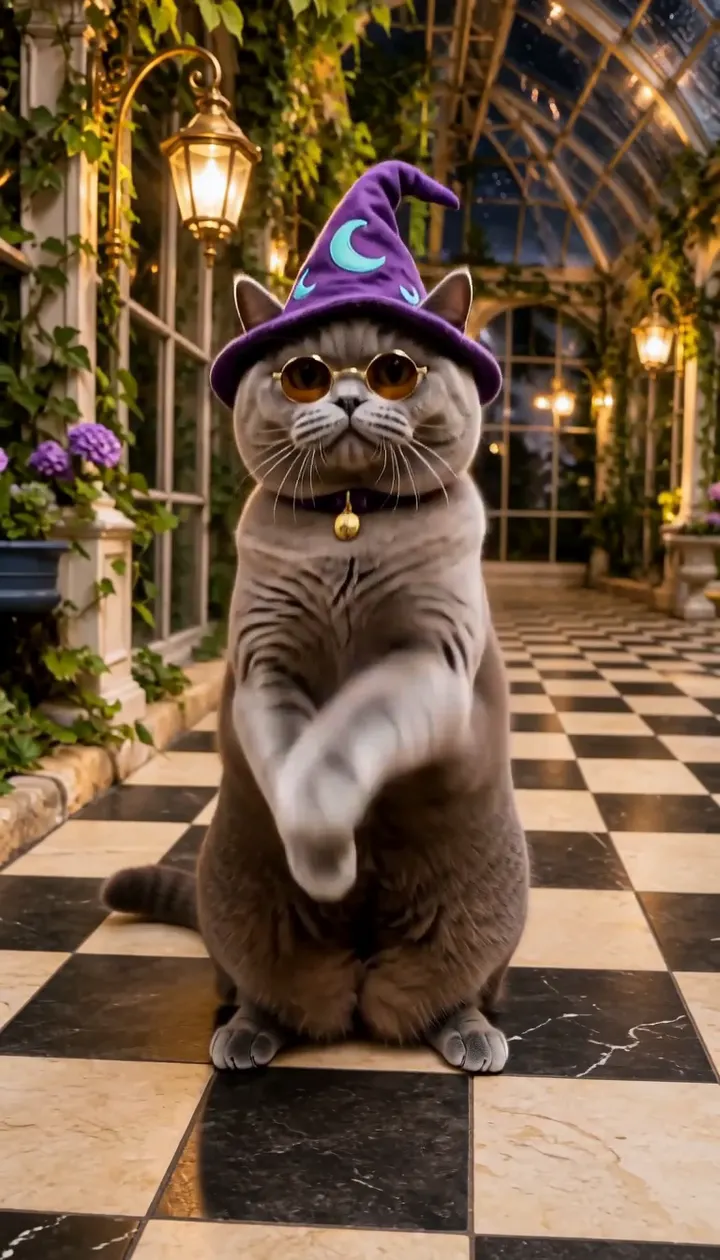
Buggin Dance AI · about 11s · 768 × 1344 original · Sound on play. Compact preview; native 768p sources available below.Recorded source demo · MiniMax H3
Open the video editor with the prepared prompt. Review credits before generating; guest checkout is available.
This original MiniMax H3 image-to-video demonstration requested 11 seconds at 768p and returned 11.552 seconds at 768 × 1344, with generated sound. The cat briefly returns to all fours before turning into a side profile; a full rear-facing turn is not shown. It uses original prepared artwork, not the reference site's performers or recording. Template follows our silent 11-second motion derivative; identity, movement and sound may vary.
The template personalizes one pet while retaining the conservatory and the reviewed close-up, paw dance and side-facing finish. Normal has an editable full-scene prompt and supported native inputs. Template accepts a subject description or authorized appearance photos of one subject.
One round gray British shorthair cat with a violet moon-pattern wizard hat, amber round glasses and a small bell collar. Keep four animal limbs and one tail.
Normal generation lets you edit the starting prompt and choose a model. Template follows this example using MiniMax H3 at 11s / 9:16 / 768p with audio. Review the quote before generating. Original prompts do not guarantee identical results.
THE SCENE / YOUR CREATIVE DIRECTION
The template personalizes one pet while retaining the conservatory and the reviewed close-up, paw dance and side-facing finish.
Begin near the pet's muzzle and hat.
Reveal the full body and keep paw gestures at chest height.
After a brief all-fours crouch, follow the quarter-turn and side-profile hops without adding limbs.
This separate video guides the action, camera and timing. Your subject photos change the featured character; this theme preserves its existing setting.
Prepare the identities and framing before opening a new take in EveryGen AI.
Avoid obstructed eyes and group pet photos. Keep all reference images of the same animal.
Simple stable hat and glasses are easier to review than multiple loose props.
Understand what the source brief controls before you edit it in EveryGen AI.
The dance direction begins near the face, then pulls back for small upright bounces, paw gestures and a turning finish. Keep enough floor space for the movement.
Use a single pet identity with consistent fur and accessories. Template adapts the included dance to that subject; it does not promise a perfect skeletal motion transfer.
The fixed workflow uses MiniMax H3 and an owned silent motion reference. Review output seconds, reference seconds and supported sound before confirming.
Start in Inspiration to shape your idea, or choose Normal to edit the prompt and model. Template follows the example. Review the quote before generating.
Use an authorized clear pet photo or describe an original character. Keep the hat, glasses and coat pattern consistent across images.
Normal can redesign the room and movement. Template keeps the included glasshouse and camera sequence, using subject photos for appearance rather than a new background.
Review the pullback, rear/side turn and final stance. Four limbs and ground contact matter more than a single attractive frame; save private downloads within 24 hours.
Use the finished video to choose one useful change for your next EveryGen AI take.
Specify whole animal paws, four limbs and one coherent tail.
Compare coat, hat, glasses and body size before and after the turn. Simplify the brief if identity drifts.
Prompts, reference inputs, source models and your new video.
Turn a pet character into a Buggin Dance AI video in EveryGen AI. Plan its look in Inspiration, edit the scene in Normal, or use Template to follow our gray cat's conservatory dance with your own subject appearance.
The template personalizes one pet while retaining the conservatory and the reviewed close-up, paw dance and side-facing finish. Photos guide appearance; they do not replace the setting.
No commercial recording or lyrics are supplied. The demo requests original generated sound. Fixed-motion input is silent, and new generated audio and timing can vary.
Use Normal for editable scene direction and compatible native models. Template retains its reviewed model, motion and settings. Review and confirm any proposed native-setting change.
Review the complete live quote, including output duration, chargeable photo or motion references and the selected funding method. An eligible pass or sufficient shared credits must fund the unchanged draft. Describing a template subject has no separate text charge.
Open Creations to follow the task and save its completed result. Private generated downloads expire after 24 hours.