Create an intimate Tiny Desk AI music video with EveryGen AI: a small room, a live-band atmosphere and a camera that brings you closer to the performers. Start in Inspiration to plan your lead and supporting image, edit a new performance in Normal, or use Template to follow our included band video with your own lead subject.
Generated videos are stored for 24 hours, then deleted. Download files you want to keep.
Tiny Desk AI video
Tiny Desk AI · about 15s · 720 × 1280 original · Sound on play. Compact preview; native 720p sources available below.Recorded source demo · Seedance 2.0 Fast
Open the video editor with the prepared prompt. Review credits before generating; guest checkout is available.
Tiny Desk AI music videos made with EveryGen AI
Listen to two original native 720p performances: the approved 15-second five-person band and the first 10-second female-led trio. Each has its own original characters, room and generated soundtrack. Press play for sound. Compact previews keep playback light. Open each native 720p source for full quality.
ORIGINAL MUSIC VIDEO / 15s · 720p
Five-person Tiny Desk AI band
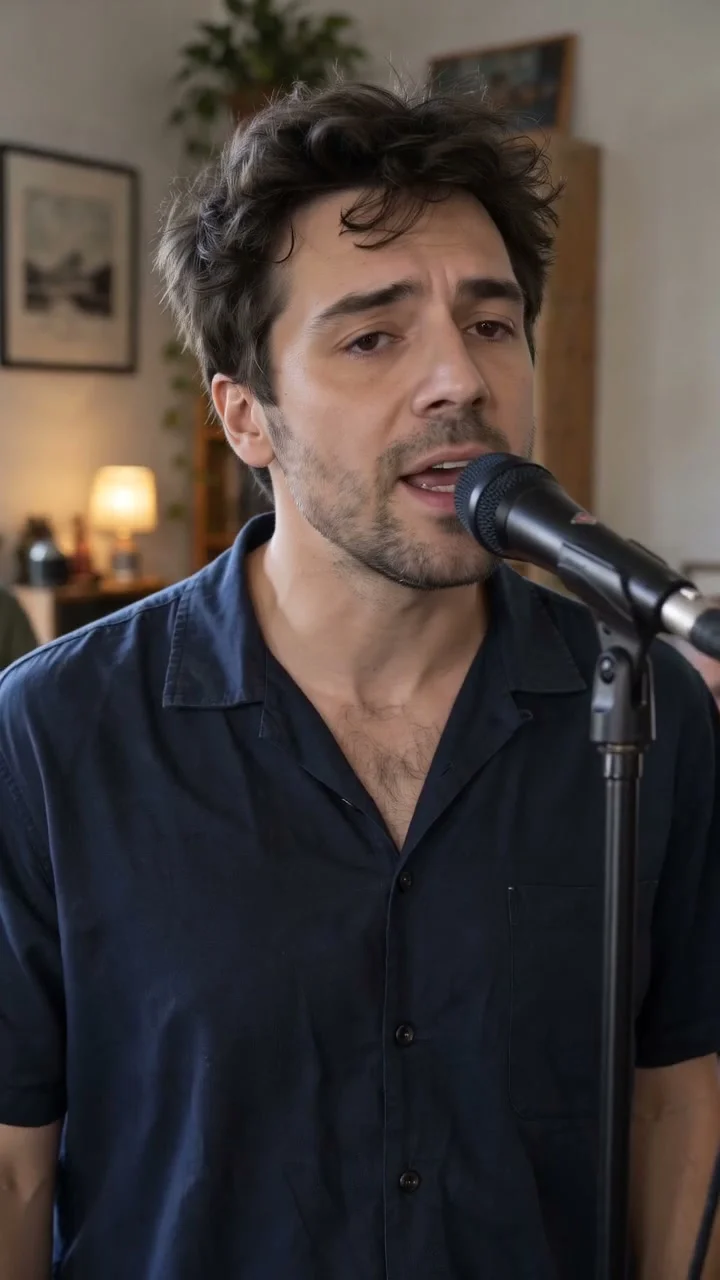
Five original adult musicians perform in a sunlit room. The camera approaches the lead, moves toward the guitarist and eases back to the ensemble. Native 720×1280, about 15 seconds, with original generated vocals and acoustic instruments.
Seedance 2.0 Fast · 720 × 1280 · Original generated audio
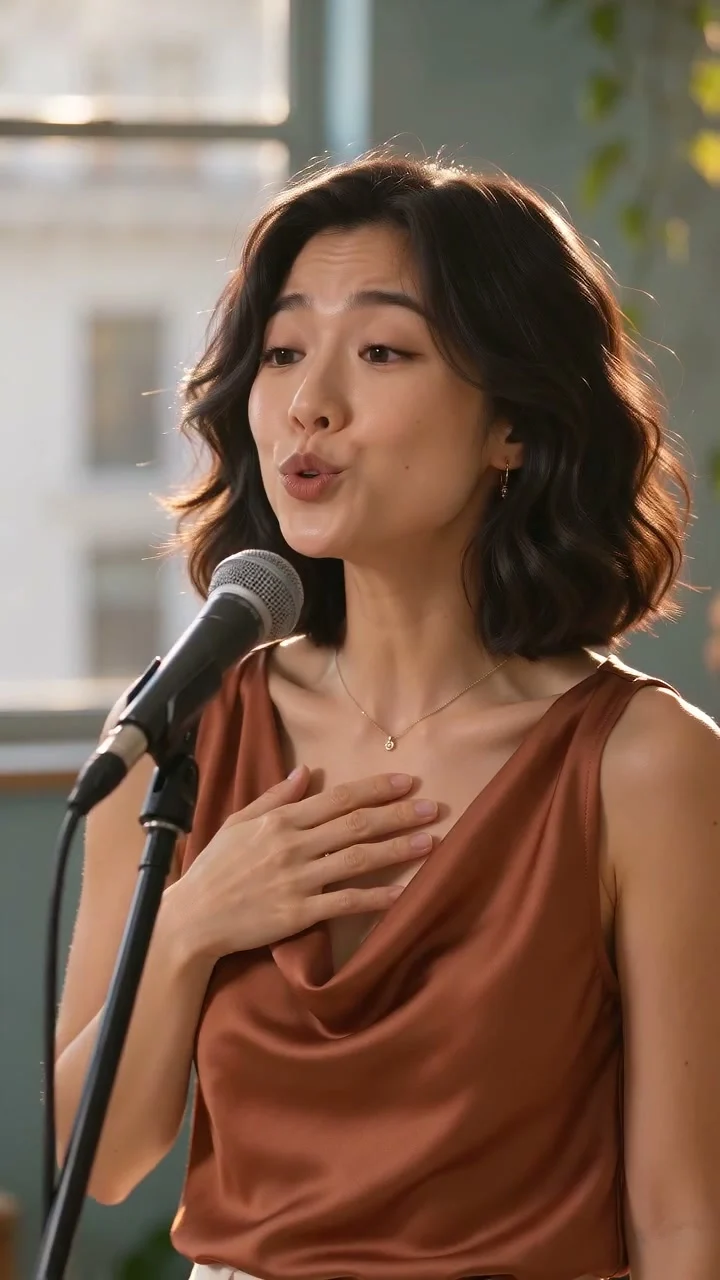
An original adult Asian woman in a copper blouse leads a bright-room trio. Native 720×1280, about 10 seconds, with original generated vocals and acoustic backing.
Seedance 2.0 Mini · 720 × 1280 · Original generated audio
Two original EveryGen AI interpretations with generated music and vocals, not a recording of a real concert. The main five-person band was made with Seedance 2.0 Fast at native 720p for 15 seconds; the female-led trio uses Seedance 2.0 Mini at native 720p for 10 seconds. The fixed Template uses our main band video with Seedance 2.0 at 15 seconds, 720p and 9:16. Exact faces, instrument technique, lyrics and lip synchronization can vary.
Demo model
Seedance 2.0 Fast
Source export
720 × 1280
Requested length
15s
Audio
Original native soundtrack
For Template describe one adult lead vocalist, or upload authorized appearance photos of that same subject. Photos guide the lead’s appearance; our main band video supplies camera movement, backing musicians and the room. Normal provides an editable prompt and native model controls.
One fictional adult lead vocalist with short dark tousled hair, light stubble, a navy short-sleeve shirt and taupe trousers.
Normal generation lets you edit the starting prompt and choose a model. Template follows this example using Seedance 2.0 at 15s / 9:16 / 720p with audio. Review the quote before generating. Original prompts do not guarantee identical results.
Included original motion template · @Video1
This separate video guides the action, camera and timing. Your subject photos change the featured character; this theme preserves its existing setting.
Tiny Desk AI features and creative controls
Understand what the source brief controls before you edit it in EveryGen AI.
The close-up live-session feeling
Tiny Desk AI brings a small-room performance into an AI video: visible musicians, acoustic instruments, daylight and a relaxed group rhythm. The main example moves toward the vocalist and guitarist before returning to the ensemble.
Your lead, our included band motion
Template attaches the reviewed EveryGen AI band video automatically. Describe a new lead or add authorized appearance photos. The room, backing musicians, instruments and camera movement remain the reference; photos change the lead's look rather than the whole setting.
Inspiration first, direct control when you want it
Talk through the performer, outfit and musical mood with the EveryGen AI Agent, prepare a supporting image and review the proposed video direction. Normal has a prefilled editable prompt and model-specific text, image and reference controls.
Original generated sound and a complete quote
Both examples include original generated vocals and instrumental audio. The fixed Template keeps its 15-second, 720p, portrait settings. Review the total credits, including attached reference-video seconds, before generation. Subject descriptions have no separate text fee.
How to make Tiny Desk AI videos in EveryGen AI
Start in Inspiration to shape your idea, or choose Normal to edit the prompt and model. Template follows the example. Review the quote before generating.
01 / YOUR NEXT TAKE
Plan your Tiny Desk AI performance
Watch the band and female-led examples. Start in Inspiration to discuss your lead, outfit and acoustic mood, or choose Normal to edit the starting prompt. The account-wide trial includes three successful replies and one supporting image; video generation is paid.
02 / YOUR NEXT TAKE
Prepare your lead and choose how to generate
For the included camera and band movement choose Template, then describe the lead or upload authorized photos of that same person. Keep the face clear. Template preserves the reference room and backing band. Normal lets you select a supported model and create an independent performance.
03 / YOUR NEXT TAKE
Review the quote, generate and download
Confirm the native settings, audio and total credits. Choose compatible funding if needed, then return to the saved draft and confirm generation. Follow the task in Creations and download the private result within 24 hours. Explore the full creative workflow at https://everygenai.live/.
Tiny Desk AI FAQ
Prompts, reference inputs, source models and your new video.
What is Tiny Desk AI?
Tiny Desk AI is an AI music-video format inspired by intimate small-room band sessions: a lead performer, accompanying musicians, a close camera and a casual live atmosphere. EveryGen AI provides original generated examples and a working generator; these are not recordings of a real concert or an official concert-series collaboration.
How do I make a Tiny Desk AI video with EveryGen AI?
Start in Inspiration to plan a performer and prepare an image, or edit the prefilled Normal prompt. Choose Template for our included band reference, add a lead description or authorized appearance photos, review the complete quote and confirm generation at https://everygenai.live/ai-trends/tiny-desk-ai.
Will my video follow the main example's camera movement?
Template actually attaches our generated 15-second band video as its fixed reference. Its private topic-specific instructions guide the approach to the vocalist, guitarist moment and gradual return to the ensemble. This guides the result rather than guaranteeing an identical frame-by-frame copy. Normal uses your chosen model and inputs without automatically attaching that motion.
Can I change the singer using a photo?
Yes. Template accepts a lead description, authorized appearance photos or both. Keep each photo focused on the same adult subject. Photos guide the lead's face, hair, proportions and outfit; the reference room, backing band and instruments stay. Use Normal for a different scene or full band concept.
Do Tiny Desk AI videos have music and vocals?
Our two examples contain original generated vocals and instrumental sound. Playback starts muted where autoplay is enabled; use the sound control to listen. Template requests new original music rather than copying the reference's exact song. In Normal, audio availability depends on the model and channel you select.
Why are the two examples different lengths and models?
The main band example is a 15-second Seedance 2.0 Fast video; the female-led example is a 10-second Seedance 2.0 Mini video. Both are native 720p. The fixed Template follows the main band and uses Seedance 2.0 with its own displayed 15-second 720p settings and complete quote.
Is Tiny Desk AI free, and where are my results saved?
The Inspiration trial gives each account three successful replies and one supporting image, not a free video. Video generation needs a confirmed paid quote or compatible pass; additional images or takes have separate quotes. Track your tasks in Creations and download private outputs within 24 hours.
Can I choose another model, duration or resolution?
Use Normal to change models and see only their supported inputs and settings. Fixed Template retains its reviewed Seedance 2.0, 15-second, 720p portrait setup. Review any proposed settings adjustment and the exact total before checkout; returning from payment does not start a video automatically.