Cabin-to-deck storytelling
Connect a smiling cabin introduction to a wide sunny ship deck, keeping the same face and outfit through the change.
AI TRENDS / DANCE COVERS
Create a 24K Magic AI Dance video with EveryGen AI. Turn a cabin smile into a sunny cruise-deck routine, with readable footwork and your own dancer. Inspiration helps prepare the idea; Normal offers an editable prompt and compatible native models.
Made with EveryGen AI · https://everygenai.live/
Generated videos are stored for 24 hours, then deleted. Download files you want to keep.
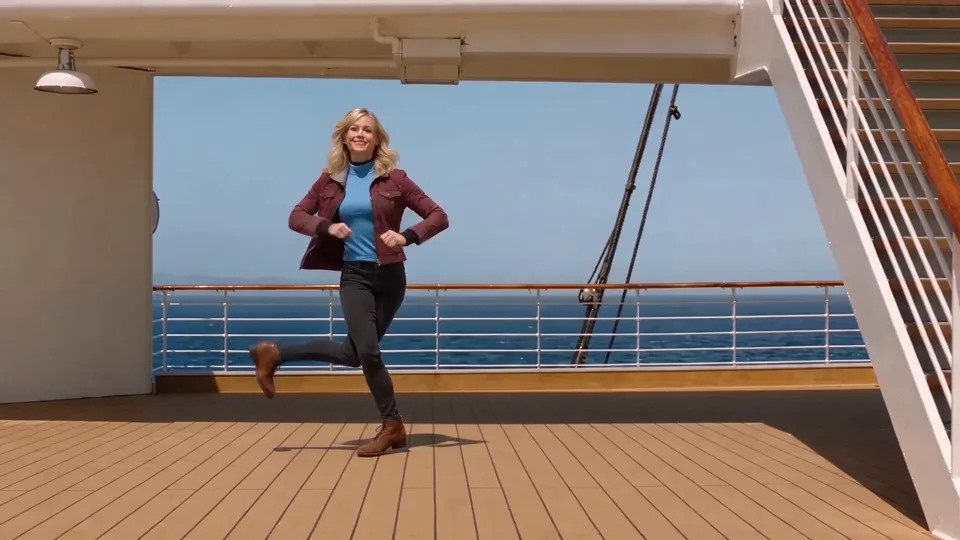
24K Magic AI Dance · about 10s · 1280 × 720 original · Sound on play. Compact preview; native 720p sources available below.Recorded source demo · Seedance 2.0 Mini
Open the video editor with the prepared prompt. Review credits before generating; guest checkout is available.
Original EveryGen AI Seedance 2.0 Mini example: 10s requested, native 1280 × 720, about 10.0 seconds with generated sound. Main playback is a compressed full-frame 720p derivative. Template uses a separate silent 10.00-second reference from this reviewed example with Seedance 2.0 and a complete confirmed quote. Original music is newly generated; exact timing and likeness can vary.
Normal offers editable text and compatible native inputs. Template accepts an authorized adult subject description or appearance photos, retaining this reviewed example’s scene and movement.
One original adult blonde dancer wearing a burgundy cropped jacket, teal top, charcoal trousers and brown ankle boots.
Normal generation lets you edit the starting prompt and choose a model. Template follows this example using Seedance 2.0 at 10s / 16:9 / 720p with audio. Review the quote before generating. Original prompts do not guarantee identical results.
This separate video guides the action, camera and timing. Your subject photos change the featured character; this theme preserves its existing setting.
Understand what the source brief controls before you edit it in EveryGen AI.
Connect a smiling cabin introduction to a wide sunny ship deck, keeping the same face and outfit through the change.
Give knee dips, crossing steps, grounded slides and the brief shoe close-up clear framing rather than a crowded montage.
Describe an adult character or use an authorized photo. Keep your chosen hairstyle, outfit and shoes consistent.
Prepare a look in the Agent or edit the complete video prompt directly. Supported frames, references and output settings depend on the model.
The included EveryGen reference supplies a 10-second cabin/deck/footwork sequence at its declared native settings, with a complete reference-processing quote.
Our demo requests fresh funk-pop music, not the commercial 24K Magic track. Results and cut timing can vary; review before sharing.
Start in Inspiration to shape your idea, or choose Normal to edit the prompt and model. Template follows the example. Review the quote before generating.
Open the 24K Magic AI Dance page in EveryGen AI and watch the example’s cabin, deck and footwork shots.
Use Inspiration to prepare your original adult dancer and supporting image, or switch to Normal for the editable public prompt. Only explicitly selected images should be applied to the video.
Choose a compatible model and input mode. An appearance reference describes who the performer is; a first-frame image also fixes the opening composition. Keep the shoes visible in preparation artwork.
Review the complete quote, including duration, resolution, native audio and any reference processing. Use compatible existing funding if needed and preserve your chosen scene on return.
Confirm generation, follow the job in Creations, inspect face continuity and foot contacts, and download the private result within 24 hours.
Prompts, reference inputs, source models and your new video.
It is a cruise-ship dance format associated with the 24K Magic topic: a playful cabin introduction, a sunny deck scene, knee dips, sliding steps and a shoe-level cut. EveryGen AI makes a new original interpretation rather than distributing the song.
Plan your dancer in Inspiration, or use Normal to edit the prefilled cruise-ship direction. Select a compatible native model, apply an authorized image if supported and confirm the full quote.
No. Our example uses newly generated original music. The commercial recording, lyrics and an artist’s voice are not included. Use separately licensed audio if you need a specific track.
Use one clear authorized adult photo with a visible face, complete outfit and shoes. A full-body image helps communicate the footwork; a first-frame input also fixes the starting scene.
Template uses our own reviewed 10-second reference for the cabin, deck and shoe sequence. Normal gives creative freedom and does not promise exact choreography.
Yes in Normal. The controls update to supported native input roles, duration, resolution and audio behavior. Confirm any proposed settings change before applying it.
Choose a supported vertical ratio in Normal and keep the whole dancer visible. Template retains its declared widescreen reference framing, so a vertical version is a separate interpretation.
Visit https://everygenai.live/ and open 24K Magic AI Dance under AI Trends. Track your own task in Creations and download within its 24-hour window.
Published EveryGen AI examples explain the inputs, settings and limits for different scenes.
Stage a lead and crew with readable dance framing.