Clear faces or features
Choose authorized photos with good light and no heavy filters. Keep each role visually distinct.
AI TRENDS / REVEALS & REACTIONS
Make a Flamingo Float AI video with one person on a pink pool float. An off-camera friend calls ‘Hey bro,’ the rider pushes away and replies ‘Thank you bro,’ and the float carries the joke across the pool.
Generated videos are stored for 24 hours, then deleted. Download files you want to keep.
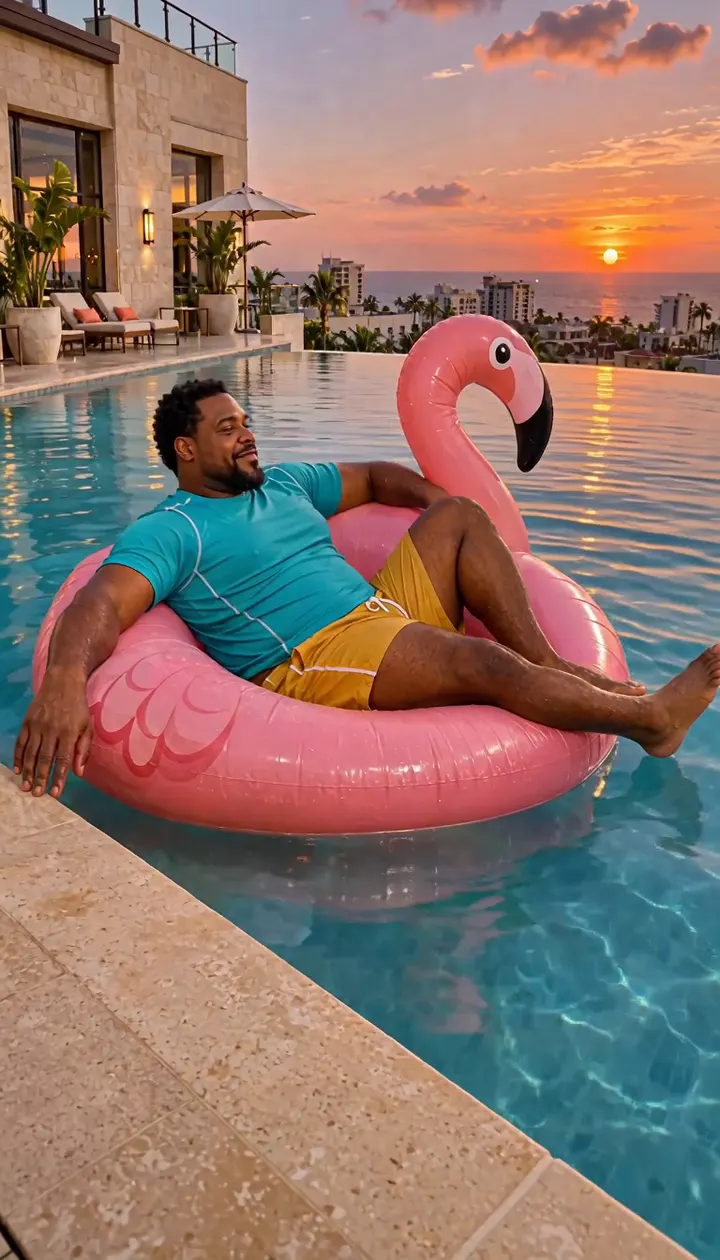
Flamingo Float AI · about 12s · 768 × 1344 original · Sound on play. Compact preview; native 768p sources available below.Recorded source demo · MiniMax H3
Open the video editor with the prepared prompt. Review credits before generating; guest checkout is available.
Original EveryGen AI demo generated with MiniMax H3 at 768 × 1344 with generated audio. The rider braces and pushes away, glides across the pool and slides off the tilted float into the shallow water. The take ends with the rider upright and laughing. The Template uses the reviewed silent motion with generated sound on a new take.
Template photo roles: Float rider. Normal supports editable prompts and compatible native inputs.
One fictional adult in a turquoise swim shirt and mustard shorts on a pink inflatable at a coastal hotel pool.
Normal generation lets you edit the starting prompt and choose a model. Template follows this example using MiniMax H3 at 12s / 9:16 / 768p with audio. Review the quote before generating. Original prompts do not guarantee identical results.
THE SCENE / YOUR CREATIVE DIRECTION
Make a Flamingo Float AI video with one person on a pink pool float. An off-camera friend calls ‘Hey bro,’ the rider pushes away and replies ‘Thank you bro,’ and the float carries the joke across the pool.
An off-camera voice draws the rider's attention.
The rider braces on the coping, pushes away and answers.
The float glides before a harmless splash inside the pool.
This separate video guides the action, camera and timing. Your subject photos change the featured character; this theme preserves its existing setting.
Prepare the identities and framing before opening a new take in EveryGen AI.
Choose authorized photos with good light and no heavy filters. Keep each role visually distinct.
Understand what the source brief controls before you edit it in EveryGen AI.
Give the float one clear subject. The off-camera voice is generated separately and stays out of the frame.
Set up the call, a visible palm push, a delayed glide and a comic sideways spill into the pool. The fall is staged as a harmless waterline splash.
Keep the pink float, near coping and the destination readable in one view. Use Normal to change the location or comic timing.
Start in Inspiration to shape your idea, or choose Normal to edit the prompt and model. Template follows the example. Review the quote before generating.
Choose a face with even light and an unobstructed profile. Template personalizes the rider's appearance.
Review the call and reaction, push, glide and ending. In Normal you can edit the dialogue and pacing.
Watch through the final waterline splash and check generated speech and float continuity. Download within 24 hours.
Use the finished video to choose one useful change for your next EveryGen AI take.
Review the full clip, especially the middle transition and ending. Simplify the action in Normal or supply a cleaner photo for a difficult role.
Prompts, reference inputs, source models and your new video.
Yes. Flamingo Floatie Falling and Hey Bro Thank You Bro refer to the same pool-float gag. This generator puts the comic splash inside the pool.
No. Template uses one rider photo and an included example. Normal lets you rewrite the scene or supply other supported references.
The direction requests both short lines and a pause between them. Generated speech, timing and motion can vary.
Check the live quote before starting. It reflects the selected model, output time, included reference seconds and any chargeable inputs. Normal settings and Template may have different quotes.
Use Normal to edit the starter prompt and compatible native settings. Template follows the reviewed example's movement and assigns your photos to named roles.
Track the task in Creations and download the private video before its 24-hour availability ends.