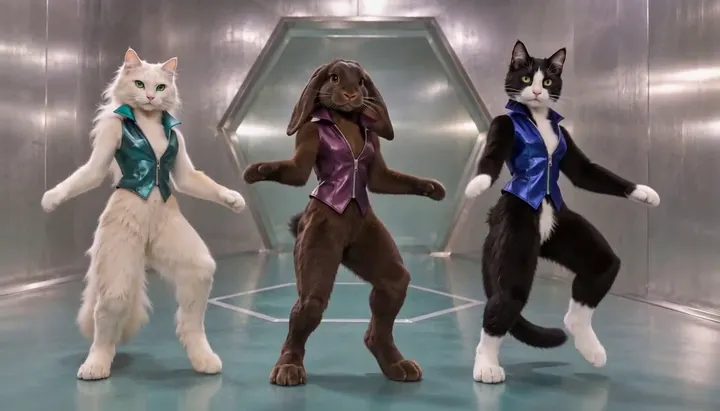
Compact playback preview · Open native 768p video ↗
MiniMax H3 · 768p · about 15 seconds · original audio
Try No Scrubs AI with Every Gen AICount the identities you want to control. A Flamingo Float scene has one rider even when an off-camera voice speaks. The I Love The Smiths elevator exchange has two people with different jobs. The No Scrubs Trio needs three distinct references so each performer stays recognizable through cuts.
A useful photo answers a specific question before generation. Which person wears the headphones? Who appears alone behind the elevator doors? If a subject changes places or turns around, what still identifies them? The examples below show how to choose inputs and review those details.
Choose the photo count from the roles
| Scene | Photos | Check on playback |
|---|---|---|
| Flamingo Float AI | One rider photo | Rider reacts and pushes away while the same float stays in frame |
| I Love The Smiths AI | One shared photo or two portraits | The left person lifts the headphones and the right person starts the line |
| No Scrubs AI Trio | Three distinct portraits, one per role | Left, center and right stay distinct through the close-up and group shots |
| No Scrubs AI Solo | One lead photo | The lead stays center while two generated dancers support the routine |
Choose authorized images with even light. One clear face or muzzle per portrait usually makes role assignment easier. A shared two-person photo works when both faces are clear and the left/right roles match the scene. When you need to control the starting composition, choose a model that supports a first frame and prepare that image accordingly.
One photo for the rider, a separate plan for the prop

A portrait gives the Flamingo Float template a rider. The pink float, coping and camera belong to the included scene. Give the joke time to read: call from off camera, hand on the edge, push, reply, glide and a harmless waterline payoff. Review the hand contact and final pose as well as the face. In Normal, you can change the timing or simplify the push if the first take rushes through it.
Assign the listener and speaker before adding dialogue
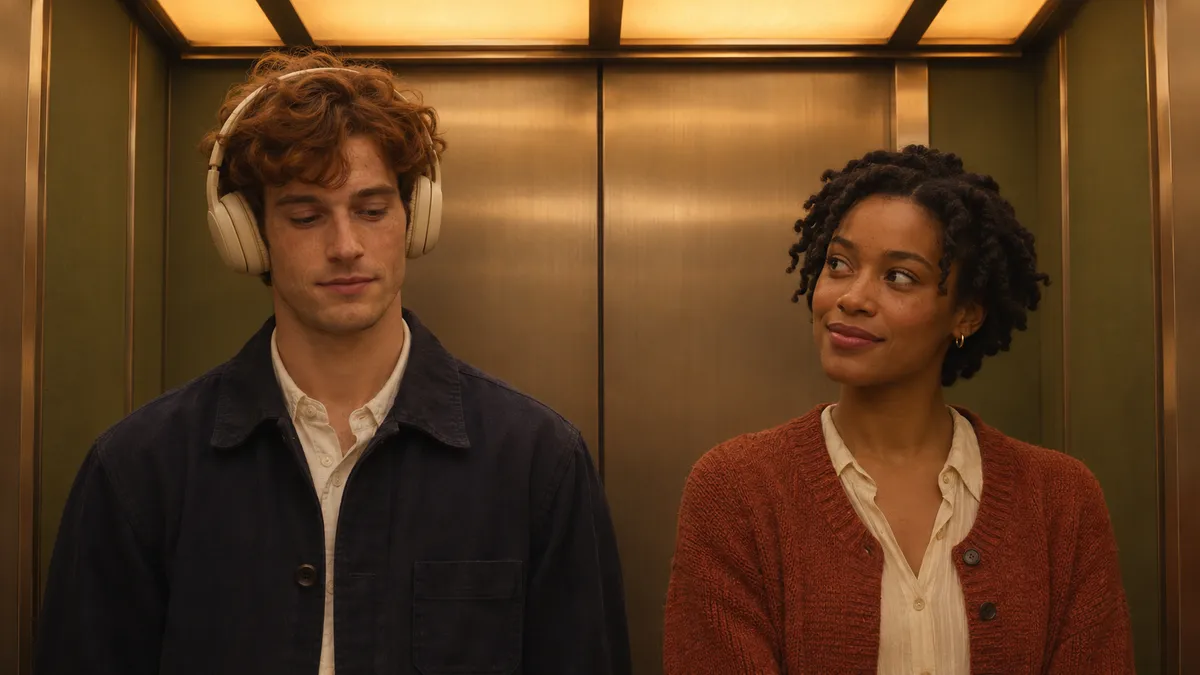
In the shared photo version, put the listener on the left and the speaker on the right. For separate portraits, use a clear photo in each named slot. Keep headphones on the listener and leave the speaking actor room to turn. A natural pause before the reply often does more for the scene than an elaborate camera move.
Listen for clear roles as well as clear words. If both mouths move at once or the headphones change sides, shorten the dialogue and keep the camera on one steady two-shot. The template requests new voices and sound. Check the audio before sharing.
Keep three performers distinct through close-ups and wide shots
Name the left, center and right performer before describing their moves. Give them distinct coats, hairstyles or wardrobe. In the No Scrubs Trio example, the chocolate rabbit stays identifiable in the elevator and the close-up before the group forms. Watch for identity drift when an arm crosses a face or the shot cuts to a different angle.
If you have one lead photo, choose Solo. It supplies two fictional backing dancers and concentrates the photo reference on the lead. The trio is a better fit when you need to control the appearance of all three performers.
Review the quote and the whole take
Template uses the reviewed silent reference motion and fixed settings. Normal is where you change the setting, motion, model or duration. Review the exact live quote before submitting either version. A longer output, motion reference or chargeable native input can change the price. Check the cut order, identities, audio and ending after completion. Download your private result within 24 hours.
Models discussed in this workflow
Check the native inputs and limitations before changing a draft. These links describe workflow compatibility, not a quality ranking.
Sources and review scope
External pages support the statements identified below. Reading a public product page is separate from testing its paid output.
- EveryGen AI reference image guide — checked 2026-11-11. Input roles and model-dependent reference behavior.
- EveryGen AI generation costs — checked 2026-11-11. Use a live quote for the exact model and reference settings.
Questions about No Scrubs AI
Can I reuse the same photo for all three roles?
The Trio template requires a distinct photo in each role. Use Solo when you only want to cast one photographed subject.
Can I upload one photo with two people?
Yes, in the I Love The Smiths shared-photo version. Put the listener on the left, keep both faces visible and use the separate portraits option if each person has their own photo.
Does adding a photo always increase the price?
Native models bill references differently. The quote for your exact model, settings and inputs shows the total before you start.
Try No Scrubs AI with Every Gen AI
Bring your idea and the reference photos for your chosen tool. Choose your settings, check the quote and create a clip you can review.