A recognizable year-change story
Use the 2026 and 2027 signs, two versions of one adult and a suitcase to make the transition understandable without a long caption.
AI TRENDS / CREATIVE EFFECTS
Make a Goodbye 2026 Welcome 2027 AI video with EveryGen AI. Give the year-change story your own face, a rainy blue-and-amber setting and a quiet farewell between two versions of yourself. Plan in Inspiration or use the editable Normal prompt with native model controls.
Made with EveryGen AI · https://everygenai.live/
Generated videos are stored for 24 hours, then deleted. Download files you want to keep.
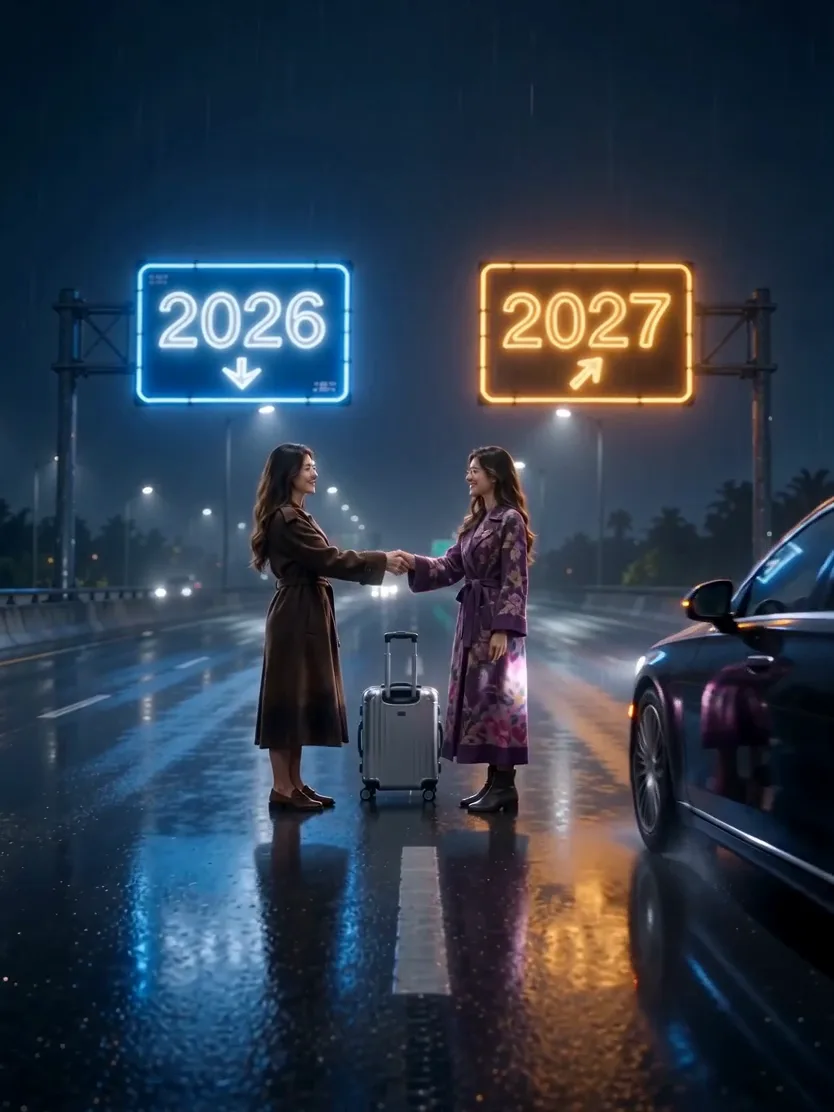
Goodbye 2026 Welcome 2027 AI · about 7s · 834 × 1112 original · Sound on play. Compact preview; native 720p sources available below.Recorded source demo · Seedance 2.0 Mini
Open the video editor with the prepared prompt. Review credits before generating; guest checkout is available.
Original EveryGen AI Seedance 2.0 Mini example: 7s requested, native 834 × 1112, about 7.0 seconds with generated sound. Main playback is a compressed full-frame 720p derivative. Template uses a separate silent 7.00-second reference from this reviewed example with Seedance 2.0 and a complete confirmed quote. Original music is newly generated; exact timing and likeness can vary.
Normal offers editable text and compatible native inputs. Template accepts an authorized adult subject description or appearance photos, retaining this reviewed example’s scene and movement.
One original adult woman with dark wavy hair, shown as the same person twice: brown everyday coat for the 2026 self and purple floral coat for the 2027 self.
Normal generation lets you edit the starting prompt and choose a model. Template follows this example using Seedance 2.0 at 7s / 3:4 / 720p with audio. Review the quote before generating. Original prompts do not guarantee identical results.
This separate video guides the action, camera and timing. Your subject photos change the featured character; this theme preserves its existing setting.
Understand what the source brief controls before you edit it in EveryGen AI.
Use the 2026 and 2027 signs, two versions of one adult and a suitcase to make the transition understandable without a long caption.
Guide the same face and hairstyle with an authorized appearance photo while the outfits distinguish the past and future versions.
Keep the handshake, release and departure gentle and readable. The car stops clear of the subjects; the scene is symbolic, not a dangerous stunt.
Wet-road reflections and contrasting signs give the short scene a coherent visual identity. Review generated digits rather than assuming perfect typography.
Normal follows your editable direction and selected native model. Template follows our reviewed original seven-second scene and declared framing.
Use Inspiration for story and supporting artwork, review the full image/video cost, then inspect and download the finished private result within 24 hours.
Start in Inspiration to shape your idea, or choose Normal to edit the prompt and model. Template follows the example. Review the quote before generating.
Open the Goodbye 2026 Welcome 2027 AI page on EveryGen AI and choose one short story, such as the included rainy-road farewell.
Decide how the two selves differ. Keep the face and hairstyle recognizable, then use clothing and color to separate 2026 from 2027.
Prepare an authorized adult image. In Inspiration, explicitly select the supporting image to use; in Normal, choose only native input roles supported by the model.
Keep the prompt focused on a connected reach, handshake, release and departure. If you choose a different concept, edit it openly rather than assuming the same fixed Template covers it.
Review duration, framing, audio, references and the complete quote. Choose compatible existing funding when needed, then explicitly confirm generation.
Review the same-face continuity, digits, hands and final action. Track the job in Creations and download private video files within 24 hours.
Prompts, reference inputs, source models and your new video.
It is a personal New Year video concept that contrasts the old and new year through two versions of one subject, year markers and a short farewell. Our example uses a rainy-road handshake and departure.
Open the topic at https://everygenai.live/, plan the story in Inspiration or edit the complete Normal direction, choose supported settings and confirm the full quote.
Our reviewed example follows the rainy-road farewell interpretation. A hug, sunrise or summit climb is a different scene you can describe in Normal; it is not the fixed motion shown here.
Use a clear authorized adult appearance photo. The direction asks for the same recognizable subject twice, with outfit differences. Model identity consistency can vary and should be reviewed.
Generated typography can change between frames. Review both year signs throughout the result; for publication-critical lettering, a separately prepared graphic overlay may be more dependable.
Our Seedance example has generated original sound. Other models have their own audio capabilities; check supported controls and the confirmed quote before submitting.
No. Public examples demonstrate the theme. Eligible account-wide short previews and paid final requests have their own server-checked allowance, settings and quotes; they can differ.
Download your private EveryGen AI result within 24 hours. Your task and settings can remain in Creations after its downloadable file expires.
Published EveryGen AI examples explain the inputs, settings and limits for different scenes.
Plan a restrained two-self New Year story.