Two clear roles
A presents near the camera while B hops behind. One cut swaps the positions; identities and outfits stay attached to their dancers.
AI TRENDS / DANCE COVERS
Make a Hop Hop Hop AI Dance video with EveryGen AI: one person points, the other hops, then they swap. Plan your pair in Inspiration or open Normal for an editable prompt and model choice. Template uses two separate dancer-photo groups and our reviewed original reference.
Made with EveryGen AI · https://everygenai.live/
Generated videos are stored for 24 hours, then deleted. Download files you want to keep.
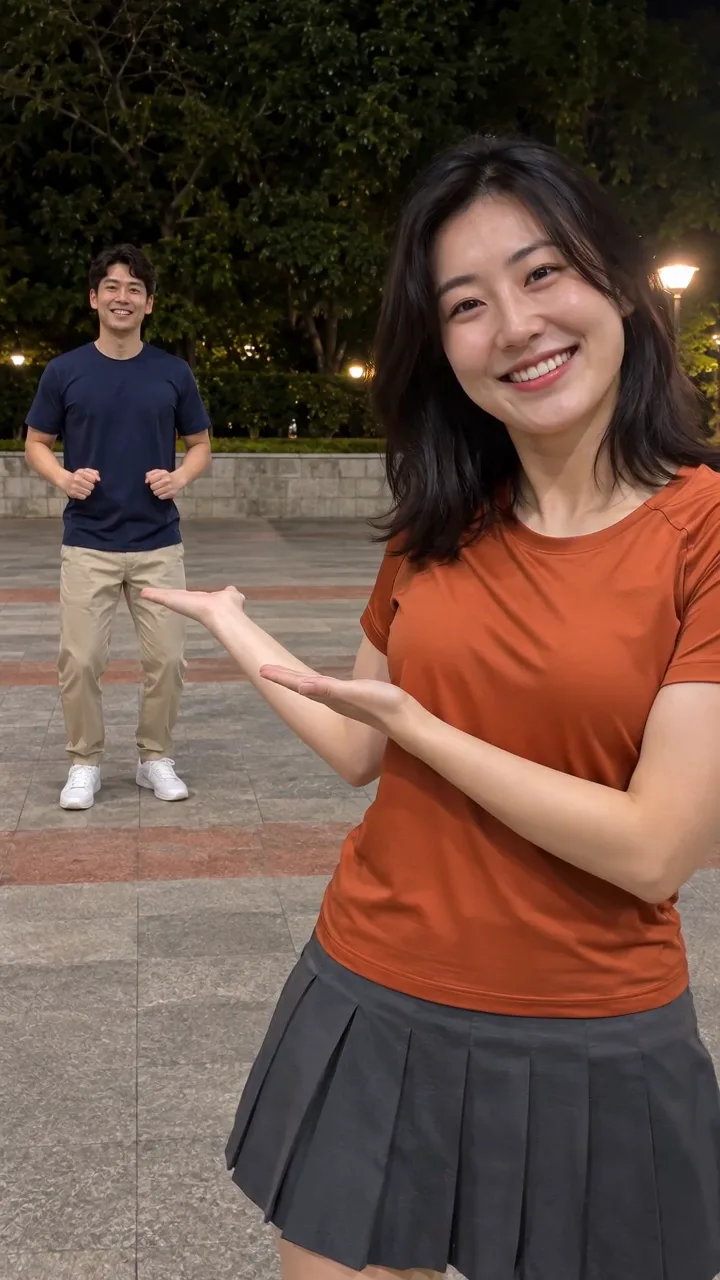
Hop Hop Hop AI Dance · about 8s · 720 × 1280 original · Sound on play. Compact preview; native 720p sources available below.Recorded source demo · Seedance 2.0
Open the video editor with the prepared prompt. Review credits before generating; guest checkout is available.
Original EveryGen AI Seedance 2.0 sample: 8s requested, native 720×1280, about 8.1 seconds with generated sound. Main playback is a full-frame 720p derivative. Template uses a separate silent 8.00-second reference from this approved example and requests new sound. The commercial trend song is not included; timing and likeness can vary.
Normal offers editable text and model-native inputs. Template requires separate authorized A/B photo groups; identities remain assigned through the cut. Photos change appearance, not the courtyard.
Two original fictional adults: dancer A, a dark-haired woman in an orange short-sleeve T-shirt and charcoal athletic skirt; dancer B, a dark-haired man in a navy T-shirt and khaki trousers. Both wear white trainers.
Normal generation lets you edit the starting prompt and choose a model. Template follows this example using Seedance 2.0 at 8s / 9:16 / 720p with audio. Review the quote before generating. Original prompts do not guarantee identical results.
This separate video guides the action, camera and timing. Your subject photos change the featured character; this theme preserves its existing setting.
Understand what the source brief controls before you edit it in EveryGen AI.
A presents near the camera while B hops behind. One cut swaps the positions; identities and outfits stay attached to their dancers.
Template has distinct A and B upload groups. Extra photos within a group show that same adult, helping avoid mixed identities.
Discuss the cast, outfits and scene, prepare an image and explicitly select it before video. Account-wide trial limits and paid generation quotes still apply.
Start from the complete editable duo prompt and choose a compatible model. Native frames, references, duration, resolution and sound determine available controls.
Template follows the adopted EveryGen example at 8s and 720p, using a silent 8-second excerpt. Its full quote includes source-video seconds and any photo preparation.
The sample has newly generated audio, not the competitor song. Check your selected model’s sound support and total quote; save private outputs within 24 hours.
Start in Inspiration to shape your idea, or choose Normal to edit the prompt and model. Template follows the example. Review the quote before generating.
Notice the foreground presenter, background hops and single role-swap cut. Inspiration helps plan a version; Normal provides the full starting direction.
Describe both roles or add authorized photos using a compatible Normal input. Template requires a separate photo group for A and B; keep faces and outfits easy to tell apart.
Normal lets you edit the choreography, model and scene. Template uses our reviewed motion and original courtyard; its photos change appearance only.
Confirm required photos, native length/resolution and the full quote, including references and preparation. Any settings adjustment needs your confirmation.
Check both halves for consistent identities, visible hops, stable feet and a clear cut. Follow the job in Creations and download the private result within 24 hours.
Prompts, reference inputs, source models and your new video.
It is a two-person dance format: one performer points toward the other, who hops behind them, then a cut exchanges their positions. EveryGen AI offers an original example and working video generator.
Plan the pair in Inspiration, or use Normal to edit the prepared prompt and choose a compatible model. Template follows the included original reference with separate A/B photos and declared native settings.
Template requires at least one authorized adult photo in each dancer group. Normal can start from text, a combined image or supported references, according to its selected model.
Template keeps the A/B photo groups separate and instructs the model to retain each identity through the cut. Inspect the final output; generative likeness and timing can still vary.
No commercial recording is included in our example. It uses newly generated audio. Sound availability depends on your selected native model; this tool does not grant music rights.
Use Normal for model choice and editable scene direction. Template preserves its reviewed courtyard and motion; appearance photos do not replace the location.
No. The approved public example, an eligible account-wide short preview and a newly generated paid final are different outputs. Review native settings and the exact quote before submitting.
Use https://everygenai.live/ and open this topic under AI Trends. Private generated files have a24-hour download window; public demonstrations are a separate inventory.