A connected dance sequence
Keep the arm sweep, hands above the head, knee accent, torso movement and closing arm accents readable as one performance, with the hands and shoes in frame.
AI TRENDS / DANCE COVERS
Create a Lisa Tarantino Dance AI video with EveryGen AI. Plan your performer in Inspiration, or open Normal to edit the dance prompt and select a compatible model. The original example connects sweeping arms, a knee accent and a wide-stance finish in one full-body shot.
Made with EveryGen AI · https://everygenai.live/
Generated videos are stored for 24 hours, then deleted. Download files you want to keep.
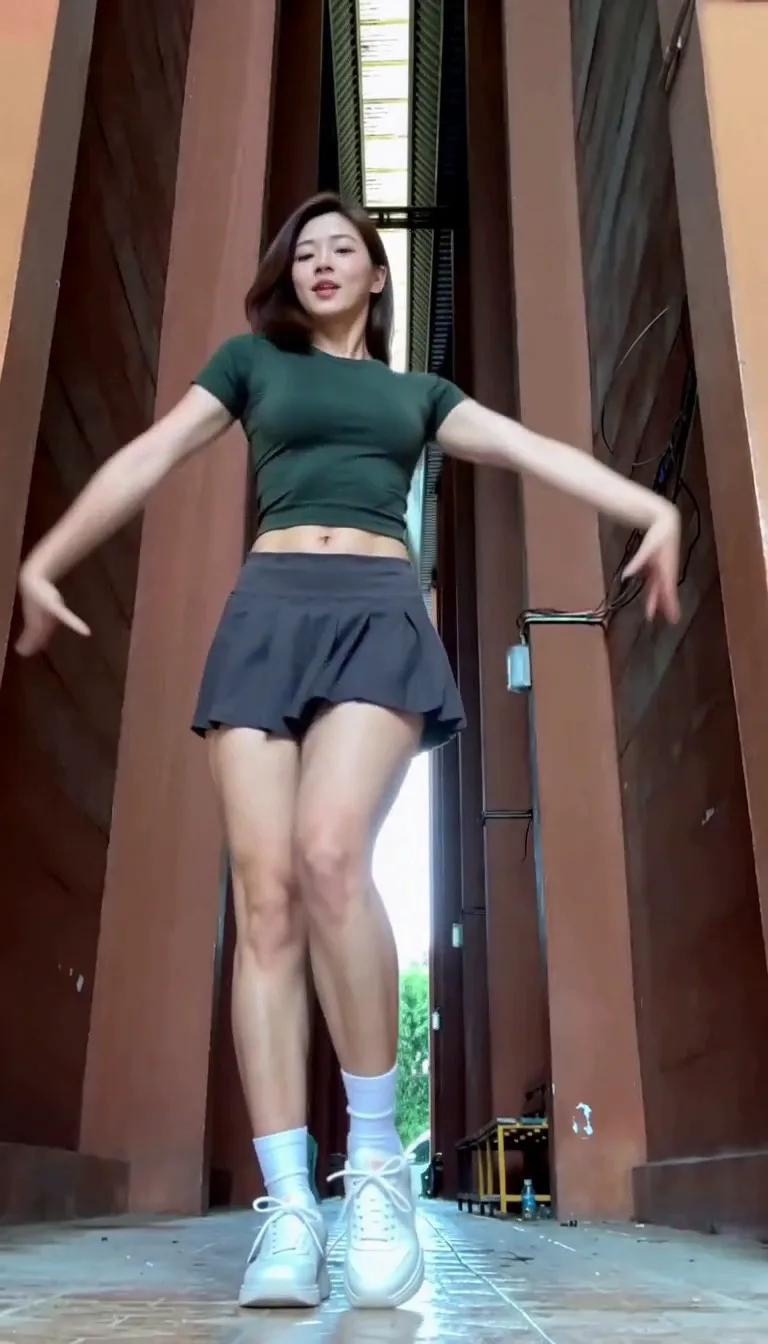
Lisa Tarantino Dance AI · about 15s · 768 × 1344 original · Sound on play. Compact preview; native 768p sources available below.Recorded source demo · MiniMax H3
Open the video editor with the prepared prompt. Review credits before generating; guest checkout is available.
Original EveryGen AI MiniMax H3 demonstration: 15 seconds requested, native 768 × 1344, about 15.1 seconds with generated sound. Main playback is a compressed 720 × 1260 derivative that preserves the full frame. Template uses a separate silent 15-second motion excerpt from this approved example and requests fresh music. No LISA likeness or commercial recording is included; results can vary.
Normal starts with a complete editable dance direction and compatible native controls. Template accepts an adult subject description or authorized appearance photos, retaining the included original EveryGen motion and scene. The native example was generated with one original appearance image and a silent motion reference, then explicitly approved by the user.
One original fictional adult woman with shoulder-length dark hair, a green short-sleeve dance top, a charcoal pleated athletic skirt, white socks and white trainers.
Normal generation lets you edit the starting prompt and choose a model. Template follows this example using MiniMax H3 at 15s / 9:16 / 768p with audio. Review the quote before generating. Original prompts do not guarantee identical results.
This separate video guides the action, camera and timing. Your subject photos change the featured character; this theme preserves its existing setting.
Understand what the source brief controls before you edit it in EveryGen AI.
Keep the arm sweep, hands above the head, knee accent, torso movement and closing arm accents readable as one performance, with the hands and shoes in frame.
Describe an original character or use an authorized adult photo. Template photos guide appearance; Normal inputs depend on the selected model.
Discuss the look, prepare an image and explicitly apply the selected result. The account-wide trial and paid image/video quotes remain separate.
Edit the complete starter prompt and choose a compatible native model. Frames, references, sound and output settings update for that model.
Template follows the included EveryGen motion at 15 seconds and native 768P. It has a separate complete quote including input-video seconds; other models can interpret the public brief differently.
Our sample has generated music, not the Tarantino recording. Review the full quote before starting, follow progress in Creations and download private results within 24 hours.
Start in Inspiration to shape your idea, or choose Normal to edit the prompt and model. Template follows the example. Review the quote before generating.
Watch the original example beside the generator. Inspiration helps plan the idea; Normal opens the ready-to-edit dance prompt.
Use one adult subject with a visible face, head-to-feet framing and room for raised arms. Use a compatible image or reference mode for your authorized photo.
Normal offers model choice and editable direction. Template preserves the included motion and scene with its declared native settings. Confirm any proposed input or setting change.
Check duration, resolution, supported media roles and the total cost. The theme instructions have no separate text fee. Some other models do not generate sound.
Confirm the request, track it in Creations, inspect the hands, knee accent, face and ending, then save the private result within 24 hours.
Prompts, reference inputs, source models and your new video.
It is a photo- or text-led way to create a dance-cover video inspired by the arm sweeps, overhead hand shapes, leg accent and rhythmic weight shifts associated with the Lisa Tarantino dance topic. EveryGen AI provides an original example and a working generator.
Start in Inspiration to prepare an idea, or use Normal to edit the prefilled direction, choose a compatible model and add an authorized photo if supported. Review the complete quote before confirming.
No. The sample features an original fictional adult dancer. EveryGen AI is not affiliated with or endorsed by LISA, her label or the source cover creator.
Our example requests original instrumental music and does not include the commercial song or competitor recording. Native sound depends on your selected model.
Choose Template for the included reviewed 15-second reference and declared MiniMax H3 settings. Appearance photos guide the same adult subject; its source location is retained. Generated timing and likeness can still vary.
Yes in Normal. Model-native inputs, duration, resolution and audio settings determine what is available. Template has a separately declared fixed reference and model.
No. Eligible verified accounts may receive one account-wide short sample through the supported workflow. A paid final is a new generation with its own duration, quality and quote, and may differ.
Open EveryGen AI at https://everygenai.live/ and choose this dance under AI Trends. Public examples stay available; private generated results have a 24-hour download window.