Clear faces or features
Choose authorized photos with good light and no heavy filters. Keep each role visually distinct.
AI TRENDS / MUSIC & PERFORMANCE
Cast yourself in a short country-rap-inspired video at a sunlit roadside stop. This single-performer setup centers on a parked red convertible, easy performance gestures and an original generated backing groove.
Generated videos are stored for 24 hours, then deleted. Download files you want to keep.
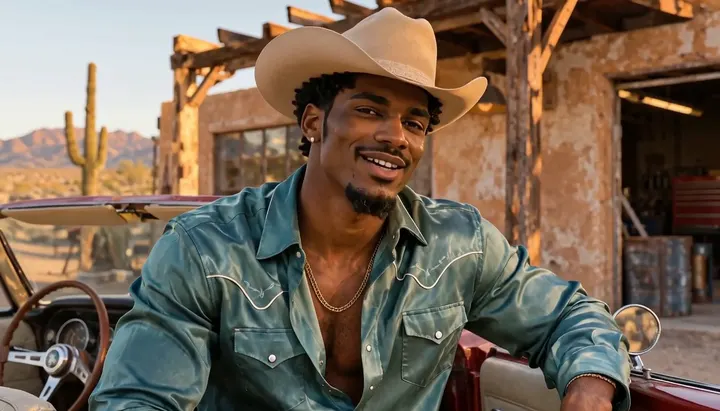
Old Town Road AI · about 8s · 1344 × 768 original · Sound on play. Compact preview; native 768p sources available below.Recorded source demo · MiniMax H3
Open the video editor with the prepared prompt. Review credits before generating; guest checkout is available.
Original EveryGen AI demo generated with MiniMax H3 at 1344 × 768 with generated audio. The solo performer stays beside the parked red convertible through a gentle push-in, then lifts their hands during the closing look. The Template uses the reviewed silent motion with generated sound on a new take.
Template photo roles: Performer. Normal supports editable prompts and compatible native inputs.
Use my photo for the solo Western performer beside the parked red convertible, with a relaxed head nod and a confident finish.
Normal generation lets you edit the starting prompt and choose a model. Template follows this example using MiniMax H3 at 8s / 16:9 / 768p with audio. Review the quote before generating. Original prompts do not guarantee identical results.
THE SCENE / YOUR CREATIVE DIRECTION
Cast yourself in a short country-rap-inspired video at a sunlit roadside stop. This single-performer setup centers on a parked red convertible, easy performance gestures and an original generated backing groove.
Establish the parked car and the solo performer.
Give the lead room for small rhythmic gestures and a relaxed nod.
Hold the lead’s expression beside the car before the cut.
This separate video guides the action, camera and timing. Your subject photos change the featured character; this theme preserves its existing setting.
Prepare the identities and framing before opening a new take in EveryGen AI.
Choose authorized photos with good light and no heavy filters. Keep each role visually distinct.
Understand what the source brief controls before you edit it in EveryGen AI.
The template puts your performer beside a parked convertible in a desert roadside scene.
The photo guides the performer’s appearance. The template supplies the car, set and movement.
Use Normal to change the outfit, setting or angle. Plan separate takes if you want both a car interior and a roadside performance.
Start in Inspiration to shape your idea, or choose Normal to edit the prompt and model. Template follows the example. Review the quote before generating.
Upload one authorized image with a well-lit face in Template.
Preview the solo demonstration and check the live generation quote.
Check facial consistency around the hat, the performer’s gestures and the ending before downloading.
Use the finished video to choose one useful change for your next EveryGen AI take.
Review the full clip, especially the middle transition and ending. Simplify the action in Normal or supply a cleaner photo for a difficult role.
Prompts, reference inputs, source models and your new video.
It creates one short visual take. Generate and edit separate takes for a longer sequence or a cut between the car interior and the roadside.
This template uses one performer. For independent identities, choose a compatible multi-reference model in Normal and define each role explicitly.
This effect generates video visuals and original sound. It does not provide the commercial track, songwriting or voice conversion.
Check the live quote before starting. It reflects the selected model, output time, included reference seconds and any chargeable inputs. Normal settings and Template may have different quotes.
Use Normal to edit the starter prompt and compatible native settings. Template follows the reviewed example's movement and assigns your photos to named roles.
Track the task in Creations and download the private video before its 24-hour availability ends.