A clear adult subject
Use an authorized photo with a visible face and consistent outfit.
AI TRENDS / DANCE & MUSIC
Turn a simple idea into a playful five-person street-dance scene with EveryGen AI. Start in Inspiration to plan your lead and prepare an image, switch to Normal for an editable prompt and compatible model, or use Template to replace the front-center dancer while following our included video.
Made with EveryGen AI · https://everygenai.live/
Generated videos are stored for 24 hours, then deleted. Download files you want to keep.
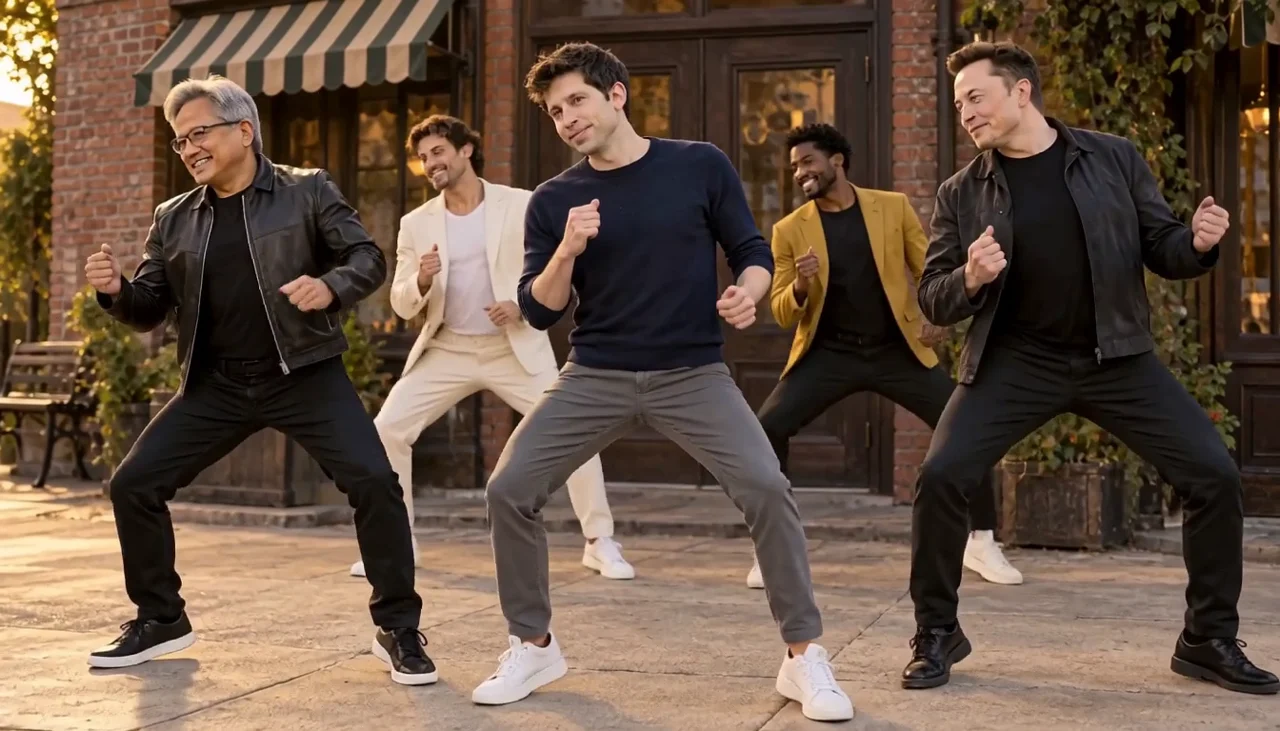
Uptown Funk AI · about 12s · 1344 × 768 original · Sound on play. Compact preview; native 768p sources available below.Recorded source demo · MiniMax H3
Open the video editor with the prepared prompt. Review credits before generating; guest checkout is available.
The accepted MiniMax H3 image-to-video demo requested 12 seconds and returned 12.25 seconds at native 1344×768 with generated sound. It is fictional AI public-figure parody, not a real performance or endorsement. Template uses a 720p reference derivative of this EveryGen AI clip with MiniMax H3 at 12 seconds/768P/16:9. No original commercial recording was supplied. Faces, exact timing and generated sound can vary.
Template accepts an adult subject description or authorized appearance photos for the front-center lead only. Four supporting dancers, the street setting and choreography follow the included EveryGen AI clip. Normal offers an editable group-dance prompt and supported native model controls. Appearance, timing and sound can vary.
One fictional adult street-dance lead wearing a navy sweater, charcoal trousers and comfortable dark shoes, with a confident friendly expression.
Normal generation lets you edit the starting prompt and choose a model. Template follows this example using MiniMax H3 at 12s / 16:9 / 768p with audio. Review the quote before generating. Original prompts do not guarantee identical results.
THE SCENE / YOUR CREATIVE DIRECTION
Use the included five-person performance as the motion and camera guide. The front-center lead is customizable; supporting dancers and the broad street composition remain part of the template.
Begin with a full-body group view and compact knee, heel and shoulder movements.
Keep the formation readable as the crew takes small coordinated steps.
Move closer to the lead for the playful shoulder lean.
Return to a wider view for a relaxed final beat.
This separate video guides the action, camera and timing. Your subject photos change the featured character; this theme preserves its existing setting.
Prepare the identities and framing before opening a new take in EveryGen AI.
Use an authorized photo with a visible face and consistent outfit.
For Normal group-image animation, keep all performers distinct with visible feet.
Understand what the source brief controls before you edit it in EveryGen AI.
A compact knee-and-shoulder groove, synchronized side steps and playful group lean combine wide views with a closer lead shot.
Inspiration helps shape your subject and image. Normal exposes the supported model controls. Template follows this topic’s own scene and replaces only the front-center adult lead.
Check native resolution, duration, sound capability and any photo or video-reference charges before confirming. Writing your theme subject has no separate text charge.
Start in Inspiration to shape your idea, or choose Normal to edit the prompt and model. Template follows the example. Review the quote before generating.
Describe an adult performer, outfit and mood in Inspiration. Use an original character or an authorized image; do not present synthetic scenes as real events.
Normal can animate a prepared group image with compatible models. Template keeps four supporting dancers and the street scene while you personalize the front-center lead. Review proposed setting changes first.
Check the full quote, follow the task in Creations, inspect faces and movement across the entire result, and download private files within 24 hours.
Use the finished video to choose one useful change for your next EveryGen AI take.
Large overlapping gestures can distort hands, faces or body positions.
Inspect identity, foot contact, transitions and generated audio before sharing.
Prompts, reference inputs, source models and your new video.
It is an AI street-dance workflow inspired by the trend’s upbeat group-performance format. Plan a lead, prepare a photo and generate a new video with supported native models.
No. The theme name identifies the visual trend. Our demo contains generated audio; we do not supply the original recording, lyrics or a license to use them.
Template changes the front-center adult lead and preserves four supporting dancers. For a different whole crew, prepare a consistent group image and use a compatible Normal image-to-video workflow. Exact identity and choreography are not guaranteed.
Yes. Normal exposes compatible models and their native inputs and controls. Template has a fixed reference workflow. Review and confirm changes to duration, resolution, framing or references before applying them.
An eligible account can try three replies and one image. Video generation is paid separately; continued conversation requires an eligible package. Check current access and the quote before using paid generation.
The complete quote depends on the model and native settings, including chargeable reference input. Confirm an eligible allowance or sufficient shared credits first. Theme subject wording has no separate token charge.
No. This is a clearly fictional AI-generated public-figure parody, not genuine footage, an endorsement or a news event. Use appropriate disclosure when sharing synthetic likenesses.
Open Creations for individual task status and the completed video. Private generated downloads expire after 24 hours, so save your result promptly.