Identity-aware directions
Ask the model to preserve face, natural skin tone, age and proportions. Check the result carefully; generative edits can change details.
EVERYGEN AI / IMAGE TREND
Create Bengali Saree AI photos with EveryGen AI. Try Jamdani and red-white sari prompts, upload your portrait, choose a model and review image credits.
Make a new portrait from text, or upload an adult photo you have permission to edit. Normal starts with a complete Bengali Saree prompt.
The free image trial uses Nano Banana 2 Lite. Choose Normal to generate directly with Nano Banana 2; eligible accounts can also choose paid image upgrades inside Inspiration.
Opening Inspiration…
WHAT IS BENGALI SAREE AI?
Bengali Saree AI turns a clothing and portrait idea into a new image: delicate Jamdani motifs, a red-and-white border or an airy kashphool setting. In EveryGen AI you control the prompt, choose a compatible model and add an authorized reference photo. Bengali styling is diverse; our everyday default has no mandatory religious accessories.
Ask the model to preserve face, natural skin tone, age and proportions. Check the result carefully; generative edits can change details.
Describe weave, drape, blouse, jewelry and background. Start with the prepared styles, then confirm an edit before replacing your current prompt.
Inspiration prepares the idea and optional image. Normal exposes native settings and the complete credit quote; this image page does not submit a video.
Choose Normal for direct creation, or discuss your portrait in Inspiration. Pick Jamdani everyday, Classic red & white or Kashphool portrait and confirm the proposed prompt.
Use a clear, well-lit adult photo with an unobstructed face. Select a model that accepts reference images. A text-only model can create a new fictional subject but cannot preserve your uploaded identity.
Choose the model’s supported aspect ratio and resolution. Image generation consumes shared credits at the displayed rate, including any chargeable references. Review the full estimate before confirming; a video-only pass does not fund it.
Inspect identity, hands, sari pleats and background. Your private image appears in Creations. Download it within 24 hours; another take is a new quoted request.
These original writing examples describe different looks. They are not hidden source prompts or promises that every model will produce the same face.
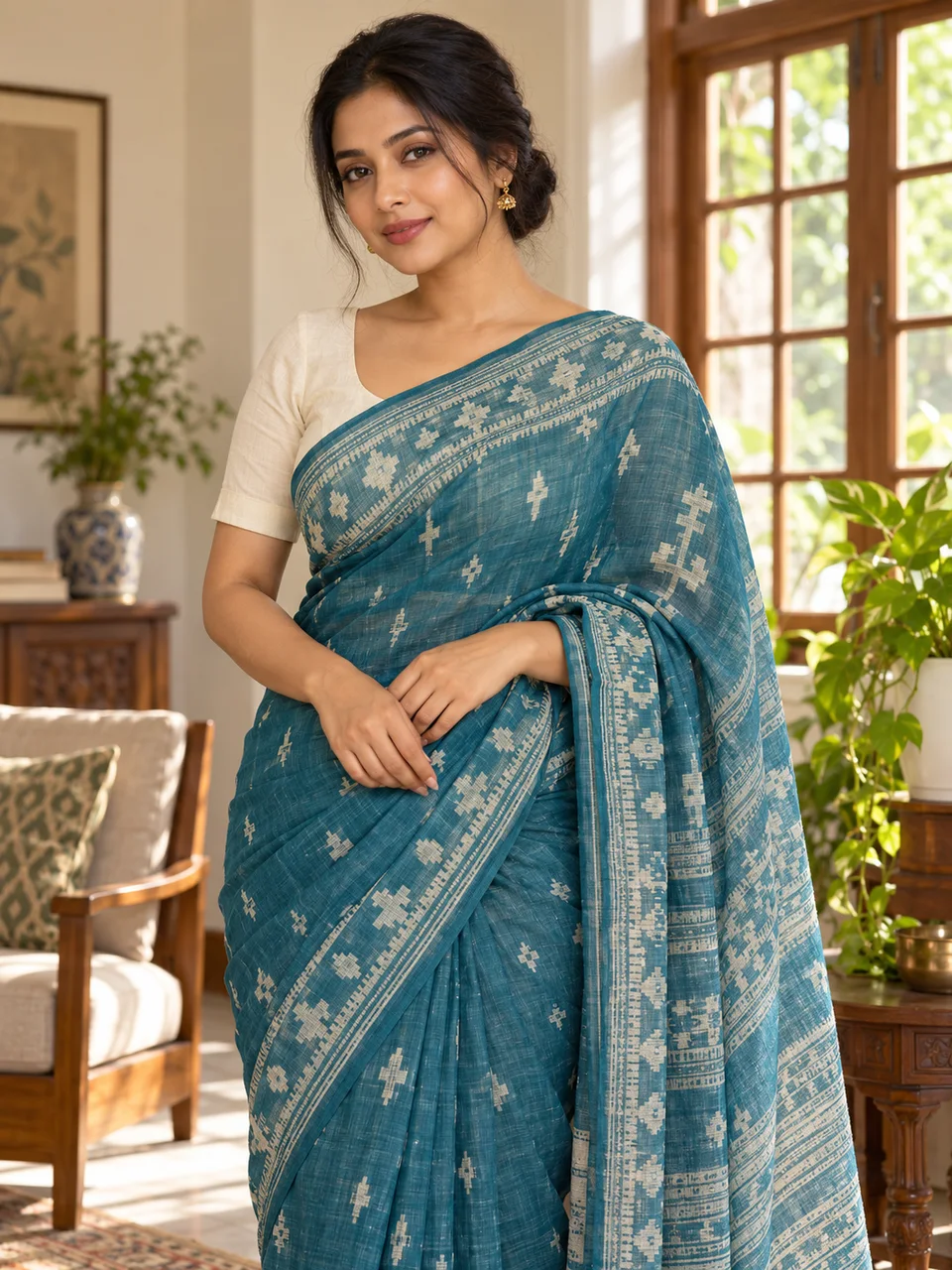
Create a realistic Bengali saree portrait of the adult in my reference photo. Preserve face, natural skin tone, age and proportions. Use a teal Jamdani sari with ivory geometric woven motifs, an opaque ivory short-sleeved blouse and small gold earrings in a sunlit Bangladeshi home. Natural skin texture, correctly draped fabric and realistic hands. No obligatory religious accessories, logos or text.
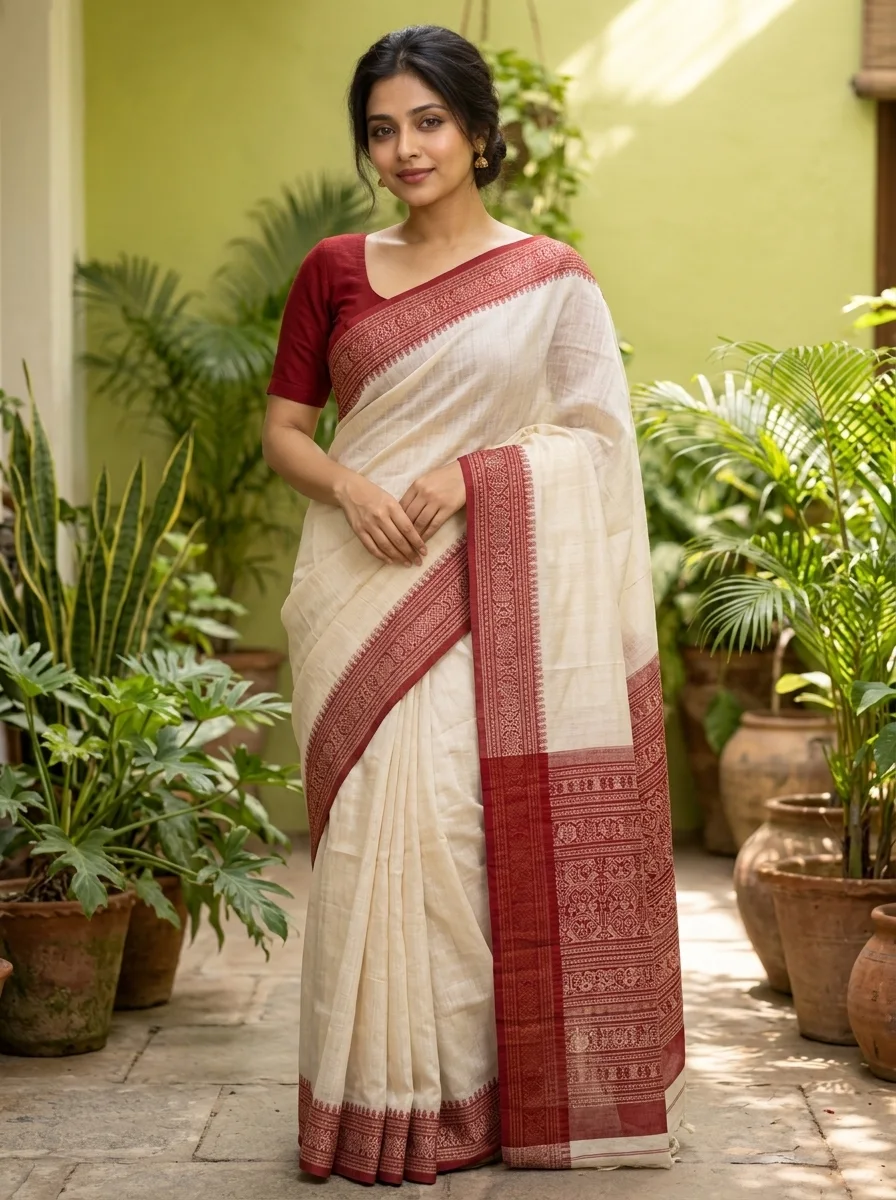
Choose this style in Normal ↑Create an elegant Bengali saree portrait of the adult in my reference photo, preserving recognizable face, natural skin tone, age and proportions. Dress the subject in an ivory sari with a wide red woven border and an opaque red blouse. Use a calm courtyard with soft morning light and understated gold jewelry. Keep any religious styling optional rather than adding it automatically. Realistic fabric and hands, no lettering or watermark.
Choose this style in Normal ↑Create a natural autumn Bengali saree portrait of the adult in my reference photo. Preserve identity, natural skin tone, age and body proportions. Dress the subject in a cream handwoven sari with a blue border and opaque blouse, standing beside softly glowing kashphool grass. Warm late-afternoon light, gentle breeze, realistic drape and skin. No added religious markings, text or logos.
Choose this style in Normal ↑EveryGen AI is useful for planning personal portraits, festive looks and social posts without a separate editing workflow. It cannot guarantee exact textile authenticity, jewelry geometry or face preservation. Use owned or authorized adult photos, avoid misleading claims about a real person, and inspect every output. Normal images use credits; Inspiration’s existing free image trial is account-wide, not a fresh allowance on each trend page.
Compare image credit packs → · Compare image models → · Try Diwali AI Transformation video →
Bengali Saree AI describes AI-assisted sari portraits: specify a Jamdani weave, red-and-white border or another Bengali clothing style, then generate a new image or guide an edit with an authorized adult portrait. It is a generative interpretation, not a physical garment fitting.
Open Normal, keep or edit the prepared prompt, upload an authorized adult portrait, choose a photo-compatible image model and output settings, review the exact credit estimate and confirm. Inspiration can help prepare the direction first.
This EveryGen AI page creates still images and belongs to Image Trends. Diwali AI Transformation is a separate video workflow. Images are not automatically animated or charged as video generation.
A clear reference portrait and an explicit identity-preservation prompt help. You can choose weave, border, blouse, jewelry and background. Face, fingers and fabric can still change; inspect the result before sharing.
No. Bengali and Bangladeshi styling is diverse. The everyday Jamdani default does not require a bindi or religious accessories; request festival-specific styling only when you want it.
Inspiration offers the existing account-wide trial of three replies and one Nano Banana 2 Lite image. Normal image generation uses the selected model's quoted shared credits; a video-only pass does not fund images. Download private results within 24 hours.
Explore the complete EveryGen AI workflow at https://everygenai.live/.
Read the illustrated Bengali Saree AI tutorial →
IMAGE MODELS
Tongyi-MAI
Fast visual sketches
1K · from 6 shared credits per image · text prompts
Google Gemini
Everyday image creation
1K / 2K / 4K · from 9 shared credits per image · photo references
Google Gemini
Detailed creative direction
1K / 2K / 4K · from 18 shared credits per image · photo references
OpenAI
Instruction-led imagery
1K / 2K / 4K · from 5 shared credits per image · photo references
ByteDance
High-resolution scene design
2K / 4K · from 16 shared credits per image · photo references
Black Forest Labs
Photography and materials
1MP / 2MP · from 14 shared credits per image · text prompts
GPT Image family
Fast concept iteration
1K / 2K / 4K · from 5 shared credits per image · photo references
GPT Image family
Reference-led image refinement
1K / 2K / 4K · from 5 shared credits per image · photo references
xAI Grok
Everyday image creation and edits
Standard · from 9 shared credits per image · photo references
xAI Grok
Flexible photo-guided compositions
1K / 2K · from 10 shared credits per image · photo references
xAI Grok
Detailed image and photo refinement
1K / 2K · from 24 shared credits per image · photo references
xAI Grok
High-resolution concepts and photo edits
1K / 2K · from 29 shared credits per image · photo references
Google Gemini
Focused 1K photo editing
1K · from 5 shared credits per image · photo references
Google Gemini
Simple 1K supporting images
1K · from 5 shared credits per image · photo references
Google Gemini
Flexible framing and image revisions
1K / 2K / 4K · from 7 shared credits per image · photo references
Discuss. Create an image. Refine your idea.
Tell me your idea. We can shape the composition, create your first image and refine its details together.