A clear before-and-after story
Begin in monochrome everyday clothes and reveal a jewel-tone sari or another festive outfit on a hand gesture. Preserve one subject and room rather than switching to an unrelated scene.
AI TRENDS / FESTIVE TRANSFORMATIONS
Make a Diwali AI Transformation with EveryGen AI. Start with an everyday monochrome portrait, snap into a colorful festive outfit and finish with a warm look to camera. Plan it in Inspiration, or open Normal for the ready-to-edit prompt, model selection and photo inputs.
Made with EveryGen AI · https://everygenai.live/
Generated videos are stored for 24 hours, then deleted. Download files you want to keep.
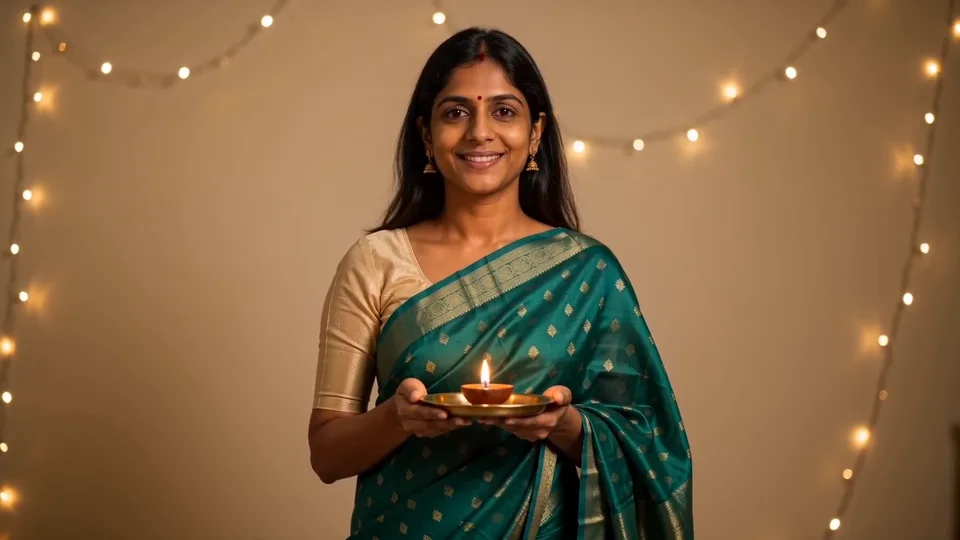
Diwali AI Transformation · about 15s · 1280 × 720 original · Sound on play. Compact preview; native 720p sources available below.Recorded source demo · Seedance 2.0 Fast
Open the video editor with the prepared prompt. Review credits before generating; guest checkout is available.
Original EveryGen AI demonstration: Seedance 2.0 Fast, 15 seconds requested, native 1280 × 720 with generated sound. The match-cut arrives around 5 seconds; the slow shoulder turn is subtle. Main playback preserves 720p and is trimmed to 15 seconds; native output is 15.104 seconds. New faces, fabric and timing can vary.
Normal starts with an editable complete Diwali transition prompt. Use text alone or an authorized adult photo with a compatible model. Inspiration prepares an idea and optional image. Fixed-motion Template is not available while its independent safety review is unresolved.
One fictional adult South Asian woman with long dark hair, a natural warm-brown complexion and a properly draped emerald festive sari with an opaque ivory blouse, holding a small diya safely on a saucer.
The generator above starts with Seedance 2.0 Fast at 15s / 16:9 / 720p with audio. Review the quote before generating. Original prompts do not guarantee identical results.
Understand what the source brief controls before you edit it in EveryGen AI.
Begin in monochrome everyday clothes and reveal a jewel-tone sari or another festive outfit on a hand gesture. Preserve one subject and room rather than switching to an unrelated scene.
Our example uses generated instrumental music. Request a fresh rhythm and review the finished audio; no competitor soundtrack is supplied.
Normal supports a complete text brief or a photo with a compatible model. The selected model determines available frames, references, duration and resolution. A first-frame model starts from your supplied image; prepare the everyday opening image if you want a before-and-after reveal.
Talk through the outfit, lighting and transition, prepare an optional image and explicitly apply it to your video draft. Image and video requests keep their own quotas and quotes.
Review the selected model, output settings and complete credit estimate. A free short sample is separate from the paid final; a new final generation may differ from its sample.
Track jobs in Creations, review the outfit and face, then download the private result within 24 hours. EveryGen AI brings planning, images and video into one workspace.
Start with the recorded prompt, choose your inputs and inspect the new take.
Watch the example, then choose Inspiration to plan your portrait or Normal to edit the complete starter prompt.
Describe a fictional adult, or upload a clear authorized adult photo with a compatible image-to-video model. Specify sari or outfit colors, blouse and jewelry.
Ask for the everyday monochrome opening, raised-hand snap, single color-and-outfit reveal and relaxed finish. Keep face, hand position and room consistent.
The example uses Seedance 2.0 Fast at 15 seconds, 720p and native sound. Other models have different supported controls. Review the complete quote and any confirmed settings changes.
Confirm the request, follow progress in Creations, check the face, hands, fabric and music, then download the private result within 24 hours.
Prompts, reference inputs, source models and your new video.
It is a festive before-and-after video idea: an everyday portrait turns into a colorful celebration look using an outfit change, warm lighting and a timed hand gesture. EveryGen AI provides an original example and a usable video generator.
Open Normal, edit the prepared prompt, optionally add an authorized adult photo using a compatible model, review native settings and the credit quote, then confirm generation. Inspiration can help prepare the idea first.
No. Bengali Saree AI in Image Trends makes still portraits and sari-style edits. This page creates a video with motion, an outfit transition and optional native sound.
A clear reference photo and an explicit prompt help, but generative video can change identity, jewelry, fingers or textile details. Review the complete output. The example is a fictional adult, not a guaranteed result for every photo.
The EveryGen AI example includes original generated instrumental sound. Choose a model and native audio setting that supports sound; some other models are silent. We do not provide the competitor recording or a licensed commercial song.
Eligible verified accounts can request one account-wide short sample through the supported free-preview workflow. The sample is separate from the final duration and resolution; unsupported models disclose a sample-model alternative. A paid final is newly generated and may differ.
The quote depends on model, duration, output tier and references. Check it before confirming. Text changes have no separate theme fee. Images use shared credits; video-only passes fund only eligible video settings. Download private results within 24 hours.
A first-frame model begins from that image. For a monochrome-to-festive reveal, prepare the everyday opening portrait first; an already festive photo can instead guide a festive portrait animation. Appearance-reference modes can offer different control. Review the selected model’s supported inputs.