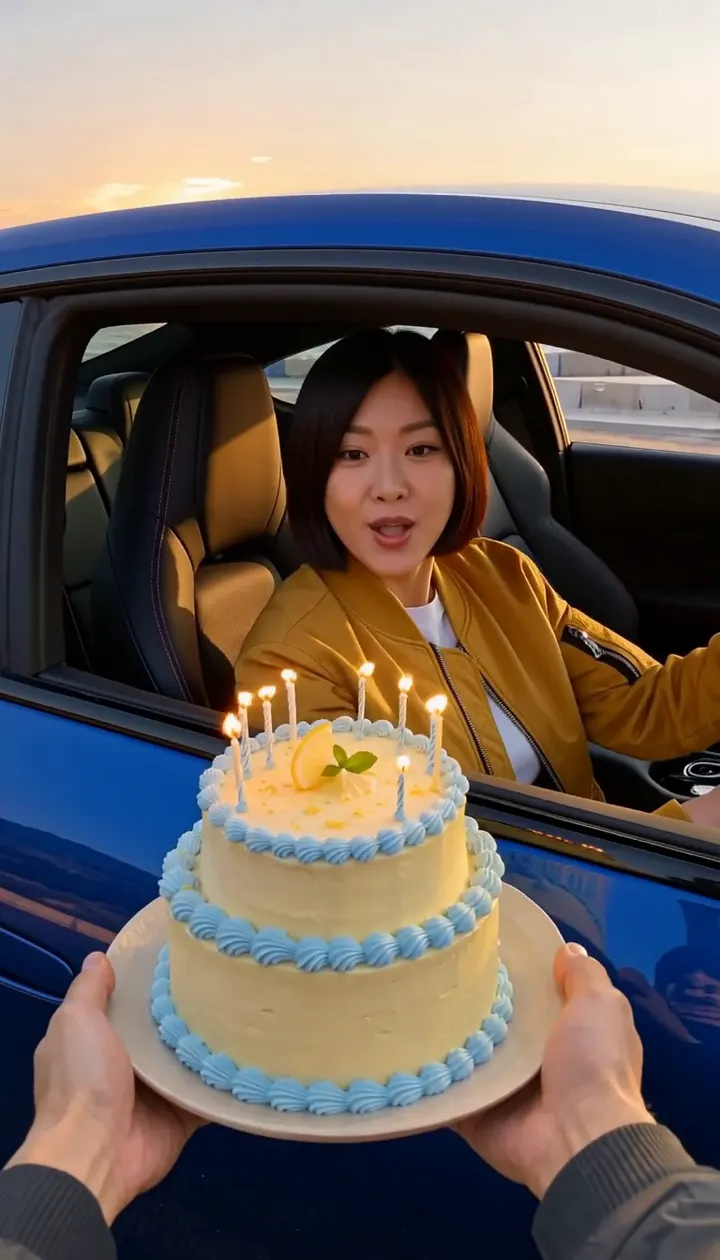
Compact playback preview · Open native 768p video ↗
MiniMax H3 · 768p · about 7 seconds · original audio
Try Birthday Car Drift AI with Every Gen AIThe difficult part of a Birthday Car Drift AI scene is the relationship between three moving elements: a foreground cake, an arriving car and a driver who must become readable before reacting. A vague request for a drift and a birthday can rush past the candle moment.
This guide uses our completed coastal-track demonstration to plan those beats. It is a fictional AI scene on a closed empty test track, not footage of a real stunt or instructions for performing one. The generator page is the place to create; the tutorial explains what to prepare and what the result actually shows.
Let the cake anchor the opening composition
Our starting scene puts adult hands and a two-tier lemon cake in the lower foreground. Lit candles make the birthday purpose visible before the car arrives. The coupe starts farther away, with empty track between it and the cake. Keep that separation: if the car or driver is already a close-up in the first frame, there is little visual space left for an arrival.
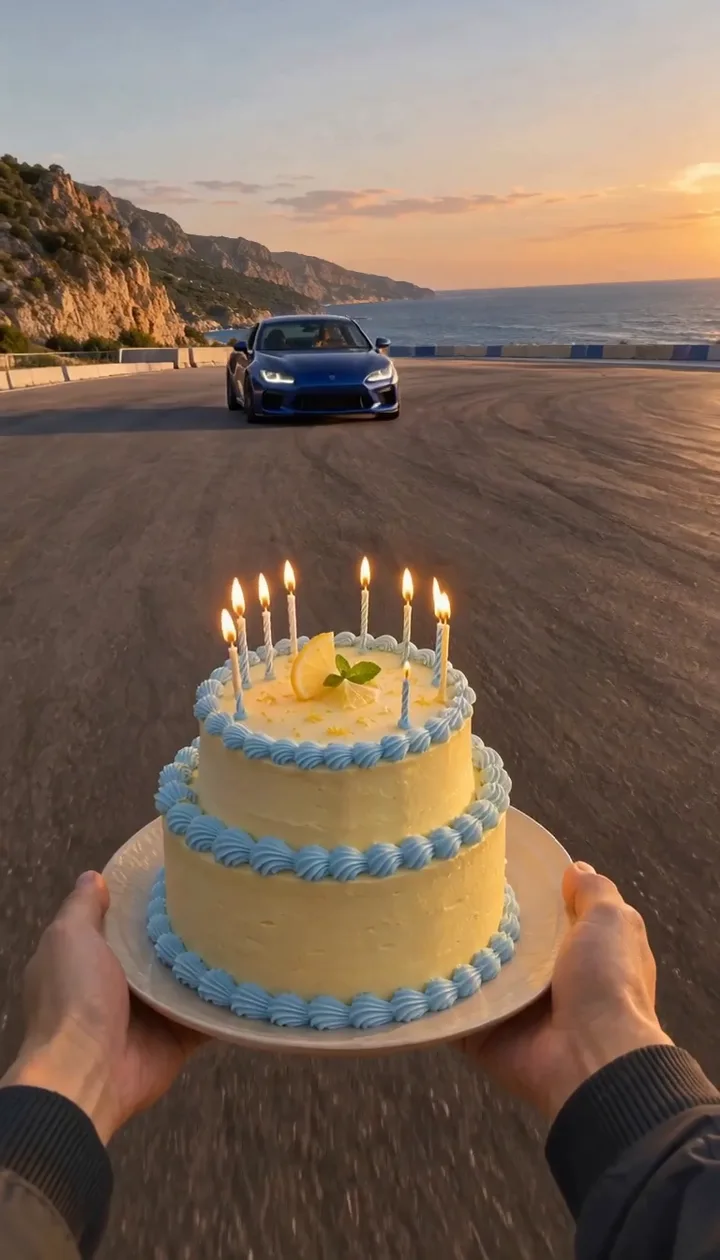
- Use one cake with a stable plate, distinct tiers and a small readable candle group.
- Keep two coherent adult hands visible rather than adding separate hand descriptions in multiple places.
- Reserve an empty arrival lane beside the cake so the vehicle does not cover the main prop.
- Choose one fictional unbranded car and keep its shape and color stable.
Write the arrival, stop and reaction as separate beats
| Beat | What the viewer needs to see | What to inspect |
|---|---|---|
| Opening | Cake and flames in front, one distant car | Stable cake and space for approach |
| Arrival | Curved drift into a side-on position | Coherent wheels, car scale and separation from hands |
| Reaction | Adult driver readable at the near window | Consistent face and enough room for the lean |
| Ending | Blowing gesture, candle smoke and final hold | Flames change coherently; the ending is not skipped |
The completed example includes the curved approach, near-window reveal and blowing gesture. The viewpoint then moves closer to the window; it is not a perfectly locked camera throughout. The ending turns monochrome. Inspect the actual camera transition and final hold instead of assuming a perfectly fixed POV from the starting image.
Choose a driver replacement or a new full scene
The fixed Template personalizes only the adult driver. The included EveryGen AI motion supplies the blue coupe, coastal track, cake, hands and camera sequence. Use an authorized clear portrait, or describe an original adult driver. A portrait background does not become a new road or birthday venue.
Normal is the flexible option when you want another cake, vehicle or location. Edit the public scene prompt and prepare a coherent starting image with supported native inputs. Inspiration can help plan that image and the action order. Review any proposed model, duration, resolution or framing change before applying it.
A fictional adult driver with a short dark bob and a mustard jacket. One unbranded deep-blue coupe arrives beside a two-tier lemon birthday cake on a closed coastal track. Keep the cake in the foreground and leave time for a clear candle-blowing reaction.
This is an editable public brief, not the private template instruction or an unrecorded original prompt. Keep new scene requests concise enough that the car approach does not crowd out the birthday ending.
Check the candle moment and the final frame
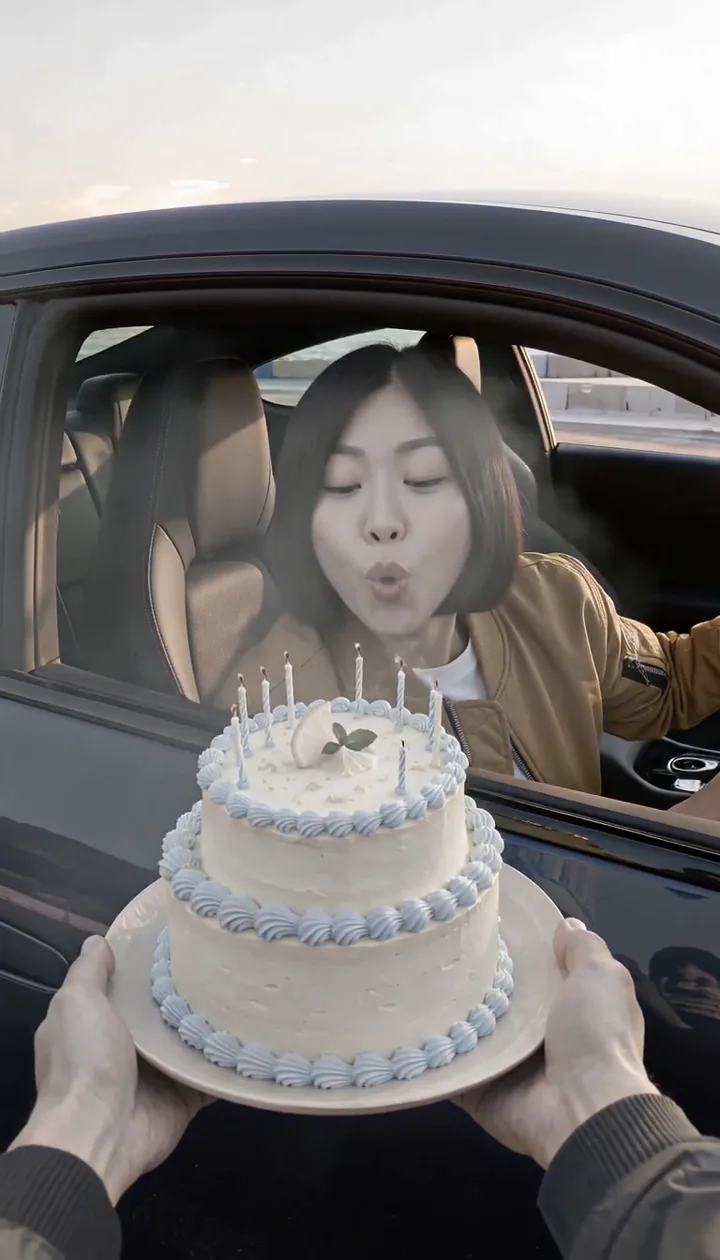
Inspect the cake from opening through ending: tier count, frosting, candle positions and plate should remain coherent. Compare the driver’s face before and during the lean. Check for extra hands, duplicate occupants, changing car badges or geometry, abrupt wheel movement and contact between the vehicle and foreground objects. A polished first frame alone cannot answer those questions.
The demo requested six seconds at the MiniMax H3 768p tier and returned a 6.592-second container at 768 × 1344 with an audio stream. Public playback uses a proportional 720-pixel-wide derivative; native download is separate. If your own Normal sequence feels rushed, simplify its beats or explicitly choose and confirm a longer supported duration. Template keeps its reviewed six-second setting.
Confirm the full quote and review generated sound
Template includes an owned silent motion reference. The live quote accounts for the selected output and chargeable reference inputs; it can differ from a text-only Normal request. Confirm an eligible allowance or enough shared credits for the exact draft before starting. Current purchase choices below come from the same catalog as checkout.
Try 3 free replies and 1 supporting image per account. New subscriptions include 10–150 Inspiration text replies each month. Creator includes 15 replies in total and Studio includes 60; a $7.50 refill adds 40 replies. Included replies use no shared credits. Images and videos use separate confirmed quotes. Existing purchased Agent rights are preserved. Video passes include no extra Agent replies.
| Offer | Included usage | Inspiration text replies |
|---|---|---|
| Premium take · $12.50 once | One successful 15-second 720p video using Seedance 2.5 or 2.0. Includes eligible 15-second 720p theme character replacement, subject-photo preparation, the built-in motion template and generated sound. | No; the account trial is separate |
| Starter · $6.90 once | 250 shared credits; no automatic renewal | No extra Inspiration replies included. Your account's free trial remains separate. |
| 500 credit pack · $10.90 once | 500 shared credits; no automatic renewal | No extra Inspiration replies included. Your account's free trial remains separate. |
| Creator pack · $19.90 once | 1,000 shared credits; no automatic renewal | 15 successful Inspiration text replies in total, with no scheduled expiry. Images and videos use separately quoted credits. |
| Studio pack · $58.90 once | 3,000 shared credits; no automatic renewal | 60 successful Inspiration text replies in total, with no scheduled expiry. Images and videos use separately quoted credits. |
| Lite monthly · $12.90/month | 660 shared credits each month; renews monthly | 10 successful Inspiration text replies per month; the monthly allowance does not roll over. Images and videos use separately quoted credits. |
| Plus monthly · $29.90/month | 1,600 shared credits each month; renews monthly | 30 successful Inspiration text replies per month; the monthly allowance does not roll over. Images and videos use separately quoted credits. |
| Pro monthly · $69.90/month | 3,900 shared credits each month; renews monthly | 80 successful Inspiration text replies per month; the monthly allowance does not roll over. Images and videos use separately quoted credits. |
| Max monthly · $129.90/month | 7,600 shared credits each month; renews monthly | 150 successful Inspiration text replies per month; the monthly allowance does not roll over. Images and videos use separately quoted credits. |
| Lite annual · $131.58/year | 660 shared credits delivered monthly; annual billing and renewal | 10 successful Inspiration text replies per month; the monthly allowance does not roll over. Images and videos use separately quoted credits. |
| Plus annual · $304.98/year | 1,600 shared credits delivered monthly; annual billing and renewal | 30 successful Inspiration text replies per month; the monthly allowance does not roll over. Images and videos use separately quoted credits. |
| Pro annual · $712.98/year | 3,900 shared credits delivered monthly; annual billing and renewal | 80 successful Inspiration text replies per month; the monthly allowance does not roll over. Images and videos use separately quoted credits. |
| Max annual · $1,324.98/year | 7,600 shared credits delivered monthly; annual billing and renewal | 150 successful Inspiration text replies per month; the monthly allowance does not roll over. Images and videos use separately quoted credits. |
| Inspiration text refill · $7.50 once | 40 successful text replies in total; no shared credits, media or automatic renewal | 40 successful Inspiration text replies in total, with no scheduled expiry. Images and videos use separately quoted credits. |
Access is separate from included usage. Additional images and videos need their confirmed quote; no automatic extra charge. Review the complete terms and any available promotion on EveryGen AI Pricing.
The demonstration requests an original suspense build and celebratory sound, not a commercial recording. An audio stream is not a guarantee of a particular song, beat or perfect sync. Review the sound before sharing. Follow the individual task in Creations and save private downloads within 24 hours.
Models discussed in this workflow
Check the native inputs and limitations before changing a draft. These links describe workflow compatibility, not a quality ranking.
Sources and review scope
External pages support the statements identified below. Reading a public product page is separate from testing its paid output.
- Birthday Car Drift AI generator and source facts — checked 2026-11-07. Actual native output, driver-only template, camera movement and limitations.
- EveryGen AI video-prompt guide — checked 2026-11-07. Scene structure, action order and review before generation.
- EveryGen AI generation-cost guide — checked 2026-11-07. Live quotes, reference input and funding distinctions.
Questions about Birthday Car Drift AI
Can Template change the car and cake as well as the driver?
This fixed template personalizes the driver and preserves the reviewed vehicle, cake and scene. Use Normal to redesign the full scene with an editable prompt and compatible inputs.
Does a six-second request mean exactly six seconds in the returned file?
Not necessarily. This request returned a 6.592-second container. Review the real output facts and the chosen native settings rather than assuming the final file has an exact integer length.
Is this a real driving stunt?
No. It is a fictional AI-generated scene on a closed-track setting. Do not present it as genuine footage or use it as instructions for a real stunt.
Try Birthday Car Drift AI with Every Gen AI
Bring your idea and the reference photos for your chosen tool. Choose your settings, check the quote and create a clip you can review.