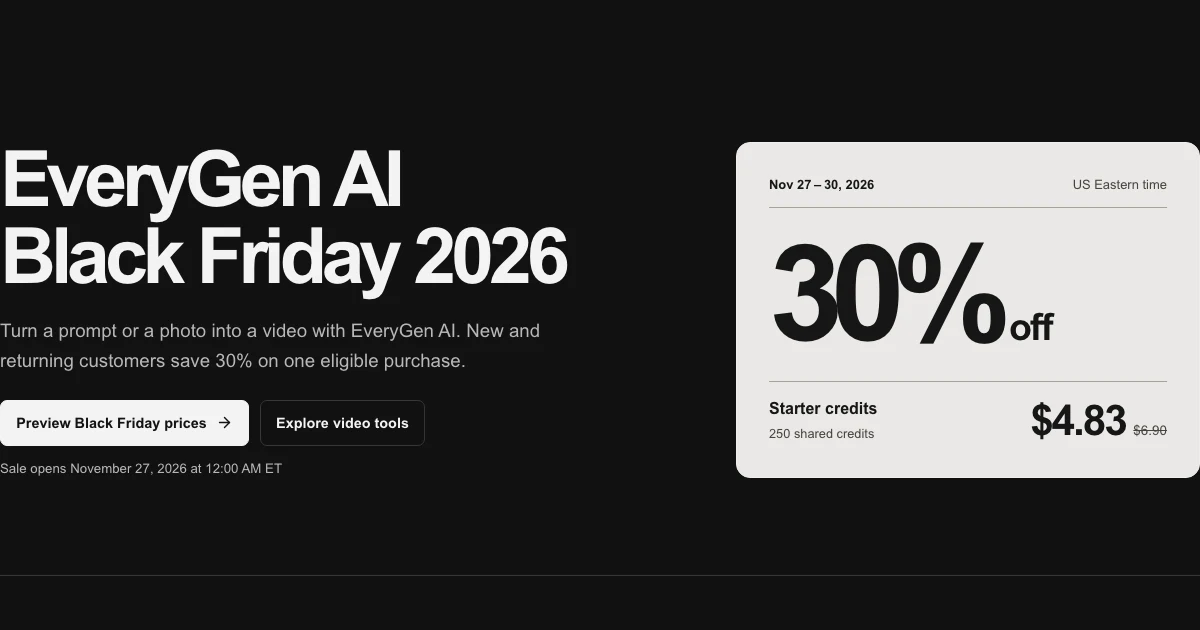
Choose your EveryGen AI offer after you know the video you want to make. One eligible theme video fits Premium take. One project with multiple drafts fits a shared credit pack. A subscription makes sense when you expect to use a fresh allowance each month.
The sale opens November 27, 2026 at 12:00 a.m. ET and ends December 1 at 12:00 a.m. ET. Before the sale opens, checkout uses regular prices. See EveryGen AI Black Friday 2026 for the preview prices and full offer terms.
Start with one short shot
For a holiday product clip, start with a photo you have rights to use. Keep the product large in the frame and the backdrop simple. Use a slow push-in or a small change in light. Check that the shape and label remain recognizable throughout the take. Add exact sale prices and legal copy in your editor after export so you can proofread them.
Start from my product photo. Keep the product centered and unchanged on a clean studio surface. Make one slow camera push-in as soft side lighting moves across the texture. Hold a clear view of the product at the end, leaving room for a caption.
Choose a supported portrait ratio for a story or a wider frame for a product page. Review the model, aspect ratio and duration before quoting. If you need the same product in two placements, budget two takes or verify that one frame can safely be cropped for both.
Work out the shared credits before buying
The EveryGen AI Pricing estimator uses a 325-credit example for a 15-second, 720p Seedance 2.0 text-to-video with native sound and no source video. A 250-credit Starter pack cannot cover that example on its own. A 500-credit pack covers one such request with 175 credits left. Two takes at the same settings require 650 credits. A 1,000-credit Creator pack leaves 350 after those two, before any image work.
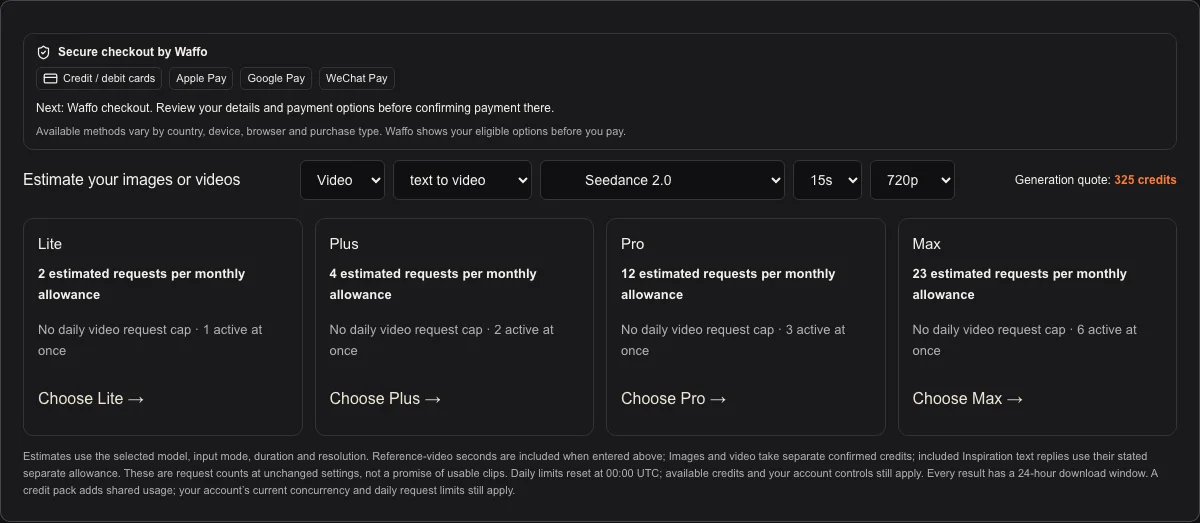
For an image-led shot, attach your actual photo and review the workbench’s confirmed quote. Model changes, longer clips, higher resolution and source-video references can change the amount. Keep enough credits for alternate takes you choose to generate. A confirmed technical failure restores the reserved allowance, and an uncertain request may remain held until its status is verified.
Match the offer to how often you create
| Project | Look at | Check before you buy |
|---|---|---|
| One eligible theme video | Premium take | One successful 15s / 720p result. Confirm template compatibility and included photo preparation. |
| One campaign or several variations | Shared credit pack | Add the quotes for the takes and images you actually want to make. |
| A recurring publishing schedule | Monthly or annual plan | Compare credits per month, simultaneous jobs, first charge and regular renewal. |
| More Inspiration planning | Text refill | 40 successful text replies. Fund generated images and videos separately. |
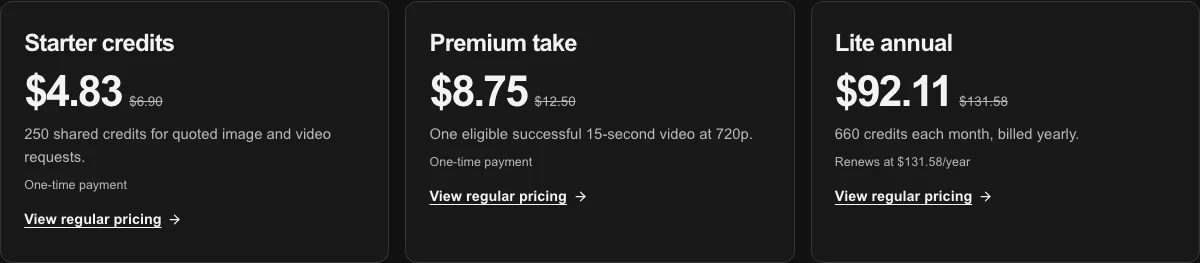
An annual subscription charges the full yearly total. Its credits and Inspiration replies are allocated month by month. If you need a large balance today for a single project, compare a one-time pack with the first month’s allowance. An annual monthly equivalent is useful for budgeting while the billed total is the cash you pay up front.
Review checkout, then return to the scene
New and returning EveryGen AI customers can use the 2026 Black Friday offer on one eligible new purchase. Existing active subscribers can use it on a one-time purchase. The checkout displays the applicable price and, for a subscription, the next regular charge. Review both amounts before confirming payment. Guests can continue with a receipt email.
During the sale, eligible monthly subscriptions are 30% off for the first 30 days, and eligible annual subscriptions are 30% off for the first 365 days. The next charge uses the regular renewal price shown at checkout.
When payment is verified, return to your saved scene and check the settings again before you generate. Open the completed task in Creations and download the file within the displayed 24-hour window. To stop a subscription from renewing, open Account → Billing.
Models discussed in this workflow
Check the native inputs and limitations before changing a draft. These links describe workflow compatibility, not a quality ranking.
Sources and review scope
External pages support the statements identified below. Reading a public product page is separate from testing its paid output.
- EveryGen AI Pricing — checked 2026-11-17. Regular prices, exact allowances, checkout and cancellation terms.
- EveryGen AI Image to Video — checked 2026-11-17. Supported photo inputs, model controls and generation quote workflow.
Questions about Every Gen AI
Which EveryGen AI offer should I use for one video?
Use Premium take when the scene qualifies for its one included 15-second 720p result. For another model, resolution, duration or references, confirm the workbench quote and choose a credit pack that covers it.
Does EveryGen AI give me all annual credits when I pay?
Annual subscriptions bill the first year in full and allocate the stated credits and Inspiration replies monthly. The exact first charge and regular renewal are shown before payment.
Can I use the Black Friday discount on two different offers?
The 2026 offer can be redeemed once per eligible customer across the sale. Choose the option that fits the work you actually plan to fund.
Make your first scene with Every Gen AI
Bring your idea and the reference photos for your chosen tool. Choose your settings, check the quote and create a clip you can review.