The wrong-seat reveal
Build the joke around the raised round table and the lower bench. The pause before the switch matters more than exaggerated reactions.
AI TRENDS / COMEDY & POV
Make the Fancy Cafe AI wrong-seat joke in EveryGen AI: one guest mistakes a tiny round table for a seat, a friend uses the real bench, and the first guest quietly moves down. Start in Inspiration to plan your characters, or switch to Normal for an editable prompt and model-specific video controls.
Made with EveryGen AI · https://everygenai.live/
Generated videos are stored for 24 hours, then deleted. Download files you want to keep.
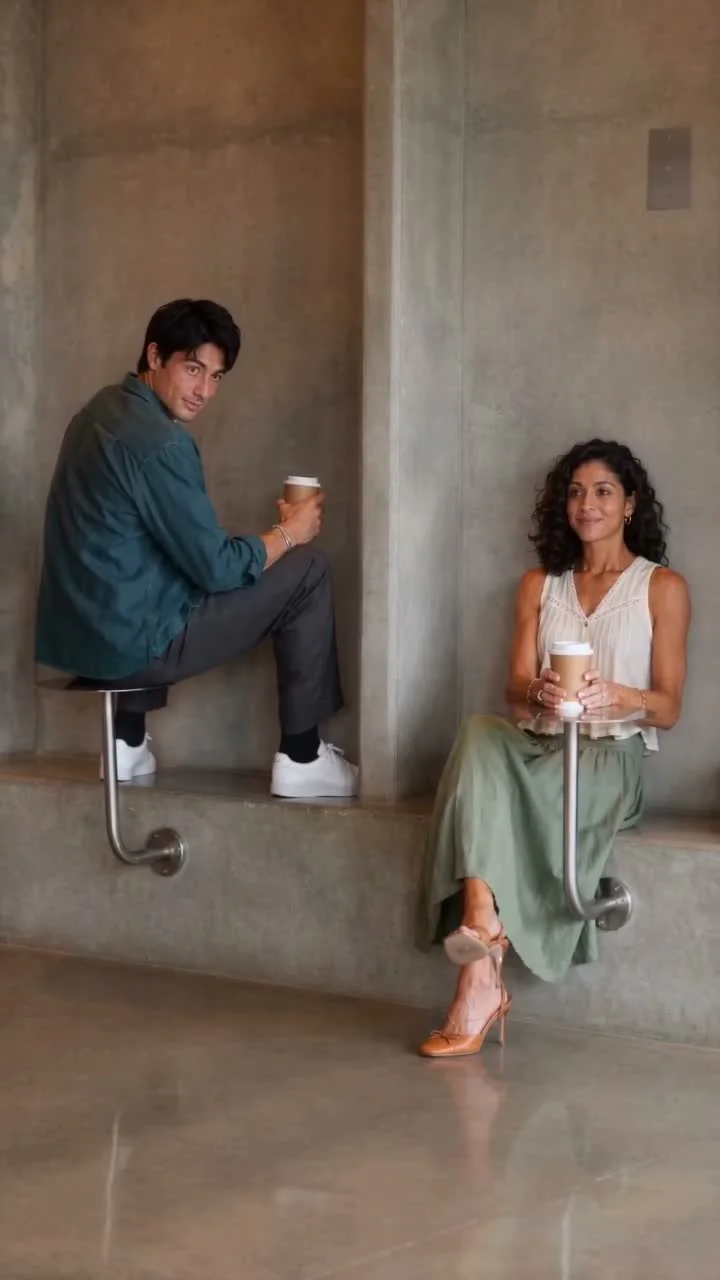
Fancy Cafe AI · about 15s · 720 × 1280 original · Sound on play. Compact preview; native 720p sources available below.Recorded source demo · Seedance 2.0 Fast
Open the video editor with the prepared prompt. Review credits before generating; guest checkout is available.
Original EveryGen AI Seedance 2.0 Fast example: 15 seconds, native 720 × 1280, with newly generated playful music and cafe sound. Main playback is a compressed full-frame 720p copy. Template follows a separate silent 15-second reference from this reviewed EveryGen example; review its two guest photos and complete quote. Exact expressions, timing and sound can vary.
Normal offers an editable scene prompt and model-specific inputs. Template requires separate Guest A and Guest B appearance photos; A starts on the high tabletop, B reveals the correct low bench. Source timing and new generated sound are separate from identity replacement.
Two fictional adult cafe guests: Guest A is a young adult man in a teal overshirt and dark trousers; Guest B is an adult woman with dark curly hair, an ivory sleeveless blouse and a sage skirt. Preserve their separate identities and assigned actions.
Normal generation lets you edit the starting prompt and choose a model. Template follows this example using Seedance 2.0 Fast at 15s / 9:16 / 720p with audio. Review the quote before generating. Original prompts do not guarantee identical results.
This separate video guides the action, camera and timing. Your subject photos change the featured character; this theme preserves its existing setting.
Understand what the source brief controls before you edit it in EveryGen AI.
Build the joke around the raised round table and the lower bench. The pause before the switch matters more than exaggerated reactions.
The reviewed Template has separate A and B photo roles: the guest on the table and the friend who sits correctly. Normal follows your chosen native inputs.
Open Normal to edit the complete scene direction. No hidden requirement to invent the joke yourself or visit a sample-only page.
Discuss the guests and mood, prepare a supporting image and explicitly apply it to a separate quoted video request.
Template follows our reviewed cafe example at its declared native settings. Normal lets you select a different compatible model and interpret the brief.
Our example has newly generated sound. Review the total quote before confirming, and save private results within 24 hours.
Start in Inspiration to shape your idea, or choose Normal to edit the prompt and model. Template follows the example. Review the quote before generating.
Open the Fancy Cafe AI generator on EveryGen AI. Watch the example once and identify the high round table and lower bench.
Choose Inspiration for planning or Normal for the prefilled video direction. Keep the original prompt available while making changes.
Define Guest A and Guest B. For the two-role Template, provide a separate authorized adult appearance photo for each guest. In Normal, use only the input roles supported by your chosen model.
Describe the cafe geometry and restrained reaction. Keep the reveal pause, the cups and the final careful move down to the bench; do not replace it with a fall or spill.
Review native duration, resolution, sound, references and the total quote. If funding is needed, choose a compatible existing offer. Guest purchase remains available through Waffo; a video-only pass does not fund unrelated image usage.
Explicitly confirm generation, follow the job in Creations and inspect the reveal and ending. Download the private result within 24 hours. Returning from purchase does not itself mean a new video has been generated.
Prompts, reference inputs, source models and your new video.
It is a visual wrong-seat joke: one guest mistakes a small cafe table for a seat, then sees a friend use the lower bench correctly and quietly changes places. EveryGen AI offers an original example and a working generator.
Open this page in EveryGen AI. Plan with Inspiration or edit the ready-to-use Normal prompt, choose a compatible model, check the quote and explicitly generate.
Template requires separate authorized adult photos for Guest A and Guest B. They retain separate roles through the reveal. Normal reference controls depend on your selected model.
You can describe a pet interpretation in Normal with compatible inputs. Our reviewed Template example is an adult duo, so a pet result is a new interpretation rather than a guaranteed copy of that performance.
No. Our public example is an original AI-generated demonstration with fictional adults, not a recording of a customer or the competitor footage.
Only when you explicitly choose a supported first-frame mode. Template photos guide the guests’ appearances while its included EveryGen video supplies the scene and timing.
No separate text charge is added for the built-in theme direction. Images, output video and any reference-video processing are included in the complete quote shown before starting.
Use EveryGen AI at https://everygenai.live/. Track the job in Creations and download private generated results within 24 hours. Public example media is a separate inventory.
Published EveryGen AI examples explain the inputs, settings and limits for different scenes.
Choose a cafe workflow for two guests and readable seating action.
Prepare guest A/B photos and follow the original cafe scene step by step.