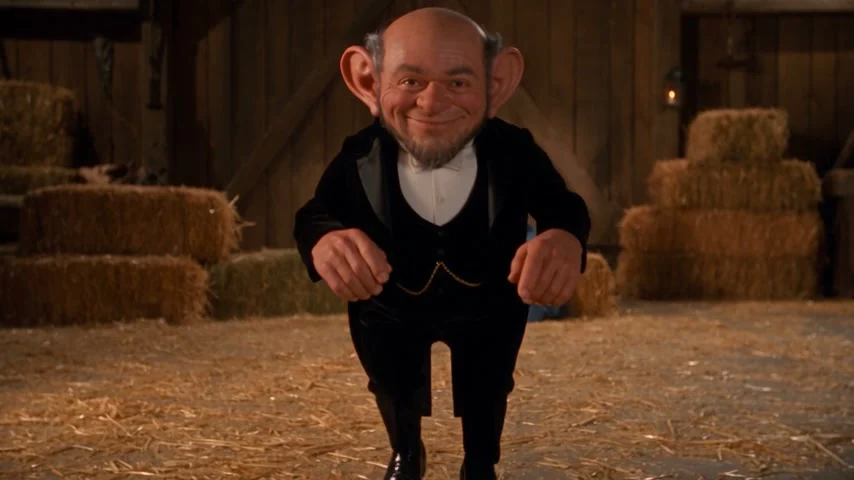
Seedance 2.5 · 480p · about 15 seconds · original audio
Try Rumpelstiltskin AI with Every Gen AIThe Rumpelstiltskin AI dance works through a simple contrast: a character tries to look secretive, then performs an unmistakably theatrical little routine. Raised heels, crooked elbows and a conspiratorial shh turn a few seconds of movement into a recognizable comedy scene. A startled observer gives the performance someone to play against.
The Rumpelstiltskin AI generator in Every Gen AI puts the original motion video beside the creation form. You can watch the full sequence, upload an appearance photo and start with a prepared direction instead of guessing what to write. This guide explains the roles, prompt and settings before you pay for a new take.
Read the dance as a sequence, not a single pose
A useful Rumpelstiltskin AI prompt needs a beginning and an ending. “Make this character dance” leaves the steps, gesture order and camera distance open. The version here begins with a sneaky walk, pauses to address the viewer, then returns to motion before finishing. That structure keeps the shh gesture from becoming the entire clip.

| Beat | Direction | What to inspect |
|---|---|---|
| Entrance | Bent knees and exaggerated tiptoe steps | Both feet remain inside the landscape frame. |
| Shh pause | The dancer turns toward the viewer and raises one finger to the lips | The hand reads clearly without obscuring or changing the face. |
| Shuffle | Heel-toe steps, light hops and a small turn | Floor contact and the same complete outfit stay believable. |
| Finish | An open-handed flourish as the seated observer reacts | The action finishes instead of cutting away early. |
The table describes the production direction, not a guarantee that a generative model follows every timed instruction exactly. Watch the clip above and judge the visible movement before deciding whether this particular template fits your idea.
What Every Gen AI has ready for your scene
EveryGen Mode includes an original action video and a default character-replacement prompt. The video supplies the movement, relative positions, camera path and timing; your subject photo supplies the replacement character’s appearance. These are different jobs, so keeping the input groups separate makes the request easier to understand.
- One foreground dancer to replace; the seated adult observer remains part of the original scene.
- One subject-photo group, with additional photos allowed only for that same identity.
- A built-in motion template, so you do not need to upload a competitor’s video.
- Custom Mode to edit the prepared direction without detaching the action reference.
- An optional environment group for a different location, separate from your subject photos.
- Native 15-second, 480p, 16:9 settings and an upfront shared-credit quote.
Choose a photo that can support full-body motion
Use a clear photo of yourself, an adult you have permission to depict, your pet or an original character. A face-only crop leaves the model to infer the rest of the body and clothing. For this dance, a visible outfit, proportions and shoes can be as useful as a sharp face because the camera keeps the performer’s feet in view.
Avoid a group photo as the main appearance reference. The background observer is not a second replacement role in this workflow. Extra subject photos should show the same identity; put a barn, room or other location in the environment group. Keep the existing setting for your first take if preserving the original staging matters most.
Pets need an additional review. A human finger-to-lips gesture may become human-like fingers or distorted paws, and a human shuffle may not suit every animal’s proportions. The default direction asks for whole furry paws, but that instruction cannot guarantee species-accurate anatomy. The published motion template uses fictional adults.
Make your Rumpelstiltskin AI video in Every Gen AI
- Open the Rumpelstiltskin AI tool. The video and generation form appear together near the top.
- Add your authorized subject photo. Keep the included setting or add location references separately.
- Stay in EveryGen Mode for the built-in prompt, or choose Custom Mode to review and edit the direction.
- Check 15 seconds, native 480p, landscape 16:9 and the current credit quote. Photo preparation and extra requests may have their own displayed usage costs.
- Confirm funding and submit. Your account creations show the task status; do not repeatedly submit while a task is already running.
- Review the complete result, then download it within the stated 24-hour storage window.
The actual prompt behind the original demonstration
This is the exact text submitted to generate our original text-only motion clip. It expands publicly described barn, tiptoe and shh elements into a fifteen-second landscape scene. It is not presented as Media.io’s unpublished backend prompt. The photo-based tool uses a separate replacement instruction with your image and this action video attached.
Create an original 15-second landscape 16:9 cinematic fantasy comedy, a complete Rumpelstiltskin-inspired tiptoe dance. Exactly TWO clearly adult fictional characters: the foreground performer is a short, middle-aged male fantasy gnome with pointed ears, gray temples, a mischievous grin, black velvet tuxedo, white shirt, bow tie and black shoes; the background observer is an adult woman in a simple blue medieval dress, seated on a hay bale at the back right. Warm wooden barn, straw floor, hay bales, amber lantern light, gentle 1980s fantasy-film texture without obscuring faces. Continuous medium-wide eye-level shot, the dancer's ENTIRE body and BOTH feet visible with room to move; only a very slow camera push. 0-3 seconds: the gnome bends his knees, rises onto his toes and begins an exaggerated sneaky walk across the straw toward center. 3-6 seconds: three clear alternating tiptoe steps, elbows crooked outward, wrists curled, playful sideways glances and a broad grin. 6-8 seconds: turn toward the viewer, bring ONE index finger vertically to the lips in a readable shh gesture, pause briefly while balancing on tiptoe. 8-13 seconds: lower the hand, spread the elbows, perform a flowing heel-toe shuffle with two light hops and a small quarter-turn, then face forward again; feet land visibly on the same floor. The seated woman widens her eyes and covers her mouth in surprise, remaining behind the dancer. 13-15 seconds: finish the final shuffle, open both hands in a cheeky theatrical flourish and hold the final grin while the observer reacts. Show the full action through the end, no early freeze or cuts. Stable faces, clothes, separate bodies and believable hands; no extra characters, text, logos, watermark or copied movie footage. Original light plucked percussion, footsteps and straw rustling only; no existing song, melody, lyrics or cloned voice.
If you write your own direction, keep the action order and specify the camera’s job: a readable full-body view, feet inside the frame and a continuous scene. Changing the camera into a close-up can make a good facial reaction while losing the dance you came to create.
Check the hands, feet and final flourish
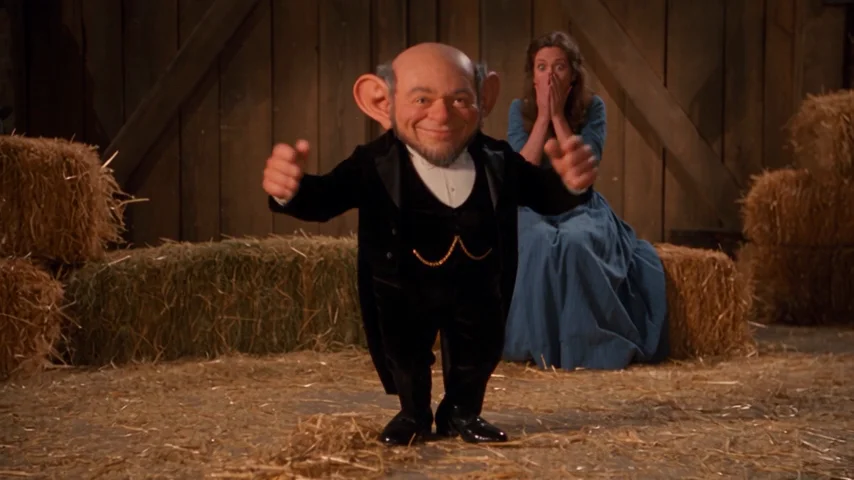
Play the entire result once with sound and once while concentrating on motion. Check that the face and outfit remain recognizable through the turn, that the observer stays separate, and that the hand near the mouth has believable anatomy. Look for sliding feet, an accidental second performer or a final gesture that ends too early.
The generated sound is original ambience and light percussion. A familiar track heard in a social post is not automatically included or licensed here. Add music only when you have permission to use it, and check timing after adding the track; this workflow does not promise exact synchronization to an unrelated recording.
Understand the native settings and quote before buying
This Rumpelstiltskin AI template uses its native fifteen-second 480p action video. Its shared-credit quote includes source-video processing as well as the output. Buying workbench access does not make every generation unlimited, and a different native template is not silently converted to fit a pass.
The $9.90 Premium take is for one eligible fifteen-second 720p result. It does not fund this native 480p setup. The purchase chooser should explain that distinction and offer compatible shared credits while preserving your photos and direction. Read Every Gen AI pricing and the fresh quote for the setup you actually intend to generate.
Extra takes, separate image generation, custom references and AI Assistant requests can require additional quoted usage. Nothing should start as an automatic extra charge. Once a result is ready, download it within 24 hours rather than treating the private creations area as permanent storage.
Questions about Rumpelstiltskin AI
Can I start without writing a Rumpelstiltskin AI prompt?
Yes. EveryGen Mode supplies the original action clip and prepared photo-replacement direction. Add a clear subject photo, inspect the quote and settings, and submit when ready. Custom Mode exposes the direction for editing.
Can I replace both the dancer and the observer?
This template supports one replacement identity: the foreground dancer. The observer stays in the source scene. Do not upload two different people into the same appearance group expecting two separately assigned roles.
Is the demonstration copied from Media.io?
No. It is an original Every Gen AI generation inspired by public descriptions of the effect. The actual submitted prompt is recorded in this guide, and the video uses original generated audio.
Is the Rumpelstiltskin AI output HD?
The prepared template is native 480p in landscape 16:9, not an upscaled HD demonstration. Review its displayed quote and keep those settings if you want to use this motion template.
How do I keep a generated video?
Download the finished private result within 24 hours. The public template stays available on the tool page, but it is separate from your private, expiring generation.
Try Rumpelstiltskin AI with Every Gen AI
Bring your idea and the reference photos for your chosen tool. Choose your settings, check the quote and create a clip you can review.