A clear face matters
The final close-up makes eye shape, hair or fur and muzzle detail especially visible. Avoid blur or heavy filters.
AI TRENDS / REACTIONS & PERFORMANCE
Create a Bad Times AI performance starring a person with Every Gen AI. Upload a subject photo and let EveryGen Mode guide the exaggerated argument: head in hands, a wait gesture, a skeptical pause and a final lean toward the phone. Edit the direction in Custom Mode.
Generated videos are stored for 24 hours, then deleted. Download files you want to keep.
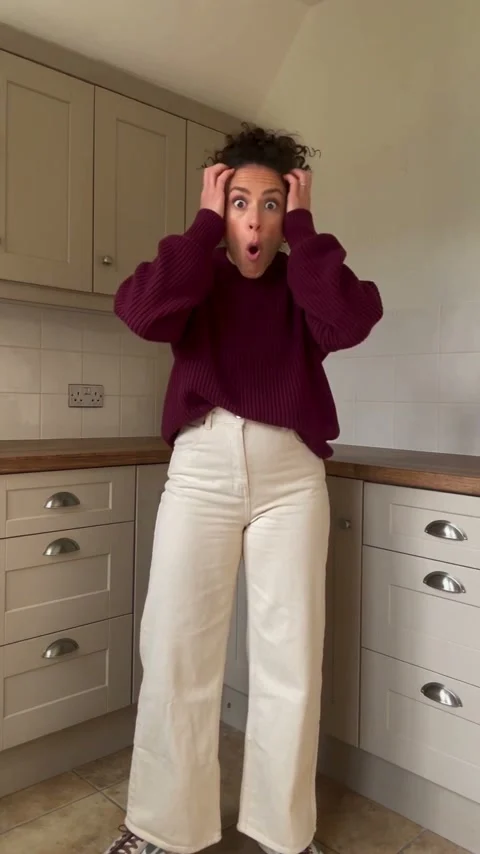
Bad Times AI · 15s · 480 × 854 original · Sound on play. Fullscreen keeps the same quality.Recorded source demo · Seedance 2.5 workspace
No generated videos yet.
Your inputs are saved while you work.This original Every Gen AI human performance was generated with Seedance 2.5 at native 480p. It is also the original motion template included in EveryGen Mode. The action reference guides acting and framing; a licensed song and exact lip-sync are not included.
Original text-only generation of fictional adults. This public clip supplies the EveryGen action template; no competitor footage or customer photo is submitted.
Create an original photorealistic vertical 9:16 15-second casual smartphone performance inspired by the BAD TIMES argument-with-the-camera meme. Exactly ONE fictional adult woman, curly dark hair in a loose bun, burgundy long-sleeve sweater, high-waisted cream trousers and plain trainers, standing in a modest lived-in kitchen with pale blue cabinets and warm wood worktop. A phone rests on the kitchen counter at a slightly low wide angle, showing her head, waist and expressive hands; tiny natural phone vibration, one continuous take, no cuts. She is playfully indignant with whoever is behind the phone, like an overdramatic lip-sync argument, never violent. Follow this exact readable sequence: 0-3s, grab BOTH sides of her head in disbelief, brows raised, mouth moving in exaggerated rhythmic syllables; 3-6s, release her head and press one open palm toward the viewer in a clear WAIT gesture while the other hand settles on her hip; 6-9s, keep hand on hip, wag her head once, throw both palms up in a questioning shrug, then pause and stare skeptically at the lens; 9-12s, take one grounded step toward the camera, point a single index finger straight at it, lean forward and continue the comic argument; 12-15s, one final emphatic forward lunge until her expressive face and pointing hand fill the lens, then freeze in a deadpan glare. Keep the same face, hair, clothes, kitchen geometry, daylight and camera throughout. Natural five-finger hands, consistent arms, stable feet and floor contact. No other characters, no extra limbs, face drift, sudden scene changes, captions, logos or watermark. Audio: a newly composed understated deep-house rhythm and expressive original nonverbal vocal sounds, no existing song, lyrics, artist voice or sampled recording.
The generator above starts with Seedance 2.5 at 15s / 9:16 / 480p with audio. Review the quote before generating. Original prompts do not guarantee identical results.
THE SCENE / YOUR CREATIVE DIRECTION
Bad Times works because the performer treats the camera like someone who has just said something unbelievable. The rising disbelief, questioning gestures and sudden close-up turn an ordinary kitchen into a miniature comedy scene. Every Gen AI supplies the original human action clip and the photo-based workflow for making the performance your own.
The performer grabs both sides of the head with an exaggerated look of disbelief.
An open hand or paw faces the viewer, followed by the hip pose, shrug and skeptical pause.
The performer steps closer and directs the argument at the lens.
An emphatic forward lean makes the face fill the final close-up.
This separate video guides the action, camera and timing. Your subject photos change the featured character; optional environment photos direct the setting.
Prepare the identities and framing before opening a new take in EveryGen AI.
The final close-up makes eye shape, hair or fur and muzzle detail especially visible. Avoid blur or heavy filters.
Hands, paws and proportions help the model adapt the source gestures without borrowing the original performer’s outfit.
Do not put several people or pets in the same appearance photo. Extra images should show the same identity.
Keep subject and location roles separate when you request a different room.
Understand what the source brief controls before you edit it in EveryGen AI.
Use your own face, an authorized adult, your pet or an original character. The first image defines appearance, and extra subject photos describe the same identity.
EveryGen Mode includes a separate original video for gesture order, expressions, pauses and camera distance. The effect is a playful argument aimed at the viewer, rather than a generic dancing pet.
The built-in prompt asks for furry whole paws and the animal’s own muzzle. It adapts the performance to the subject’s proportions while keeping the source gesture sequence. Inspect the result for anatomy changes.
Keep the built-in prompt or edit it in Custom Mode. Preserve the source kitchen, replace the location from separate photos, or blend settings into one coherent environment.
Start with the recorded prompt, choose your inputs and inspect the new take.
Choose a person, pet or character with visible face and body features. Additional appearance photos belong to the same subject; use the environment group for locations.
EveryGen Mode supplies the motion reference and prompt. The prepared setup is 15 seconds, 9:16 and native 480p with original audio. Open Custom Mode if you want to edit the direction.
Review the generation quote before approval. Watch the head grab, wait gesture, forward lean and close-up for identity and anatomy consistency. Add a licensed Bad Times sound separately if you plan to use that recording.
Use the finished video to choose one useful change for your next EveryGen AI take.
For pets, inspect the wait gesture and close-up for human-like fingers, palms or a human-looking mouth. A single take can retain parts of the source clothing or hand shape.
The face should stay recognizable as it moves toward the phone, without switching to the source actor.
A convincing reaction is not proof of exact song lip-sync. Review the whole clip with any licensed sound you add.
Prompts, reference inputs, source models and your new video.
It is a photo-to-performance workflow for the argument-with-the-camera meme: a head grab, wait gesture, questioning reaction, pointing and an emphatic forward lean. Every Gen AI supplies an original action template and editable direction.
You can upload a pet photo, but transferring human hand gestures to paws can produce human-like anatomy. Start with a person for the performance shown here and inspect animal results carefully; the model does not guarantee a species-accurate replacement.
EveryGen Mode includes both the prompt and the original motion video. You only need the subject photo. Custom Mode lets you change the direction while keeping your references attached.
Add location photos in the environment group and choose replacement or blending. With no environment photos, the source setting is preserved. A setting change can still affect generated continuity.
The prepared Bad Times AI setup uses Seedance 2.5 for 15 seconds at 480p in vertical 9:16. The quoted studio credits cover source-video processing and the generated output. Plan photo and duration limits still apply.
No song recording is bundled with these original examples. Generated mouth motion follows the performance reference, but exact synchronization to a separate song is not guaranteed. Add a licensed track and inspect timing in your editor or posting app.
Yes. Play the human performance on this page without spending generation credits. Creating a new video requires the displayed quote and a funded eligible account.